In administration of Phoca Restaurant Menu component you can easily make a screenshot of menu and paste it on social networks.
Making screenshot feature only works in Chromium based browsers. To use this feature, please use browser like: Chrome, Opera, Brave or Avast.
First of all, enable this feature in Phoca Restaurant Menu options. Then go to specific menu in administration and click on Preview button. A popup window with current menu will be displayed. At the bottom of the popup window you will see a Take a screenshot button. After clicking it, a screenshot of the entire menu is saved to the clipboard on your computer.
Now, just visit your preferred social media website, create new post and press CTRL + V to paste the screenshot to this post.
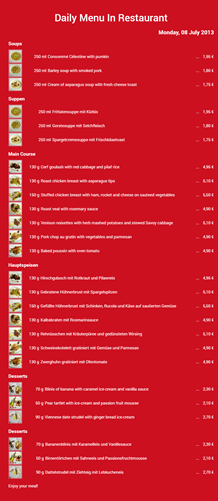 Phoca Restaurant Menu - Screenshot of Daily Menu