We are living in an era where AI agents are becoming increasingly capable of handling complex programming tasks. But how do they stack up against each other when given a highly specific, strict set of instructions? To find out, we tested 11 free, web-based AI models.
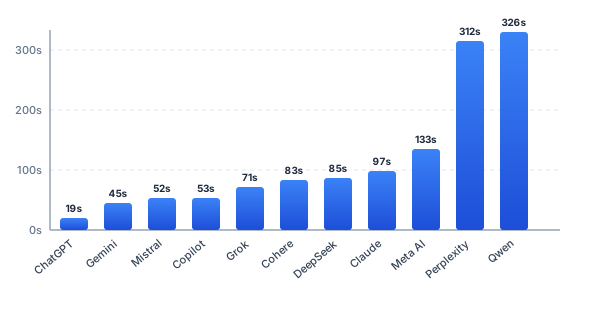
Our goal was to evaluate their ability to build a comprehensive application without relying on external libraries. The primary criteria were the application's complexity, bug-free execution, functional logic, and UI/UX clarity (especially how well the app indicates the active typing position to the user). Processing time was recorded but served as a secondary metric.
The Prompt
We provided all 11 AI agents with the exact same, rigorous prompt. The challenge was to build a modern, fully functional "Typing Speed Test (WPM)" web application using strictly Vanilla JavaScript, HTML, and CSS. No React, no Tailwind, and crucially. No charting libraries like Chart.js.
Act as an expert frontend developer and UX/UI designer. Your task is to build a modern, fully functional "Typing Speed Test (WPM)" web application.

Provide the complete, working code split into 3 separate files (`index.html`, `style.css`, and `script.js`), or combined into a single HTML file if you prefer. Do not use any external libraries, frameworks (like React, Tailwind, or Chart.js), or placeholder comments (e.g., "// rest of the code"). Write the full, executable code.

Here are the strict requirements for each part:

1. HTML Structure:
- Semantic HTML5 structure in English.
- Complete <head> section with relevant SEO meta tags, OpenGraph tags, and a valid JSON-LD schema (type: WebApplication or SoftwareApplication).
- The UI must include:
  - A header with the app title and a native SVG icon (inline).
  - A display area for the text to be typed.
  - Real-time HUD showing remaining time, current WPM, and Accuracy.
  - A hidden "Results" section that appears when the test is finished, containing placeholders for two native SVG charts.

2. CSS & Styling:
- Modern, clean, and elegant "Light Mode" aesthetic (white or light-gray background with a vibrant accent color like blue or teal). Ensure high contrast and professional typography.
- Use Flexbox or CSS Grid for a responsive layout.
- Styling for the typing text: correct characters (green), incorrect characters (red), and untyped characters (dark gray or black).
- Add smooth transitions and hover effects for buttons.

3. JavaScript & Application Logic:
- State Management: Track time (default 30 seconds), correct strokes, incorrect strokes, total strokes, and WPM history per second.
- API Integration: Before the test starts, asynchronously fetch a random quote from `https://dummyjson.com/quotes/random`. Extract the `quote` text and display it for the user to type. Show a loading state while fetching.
- Typing Logic: Listen to global `keydown` events. Start the timer on the first keypress. Calculate real-time WPM using the standard formula: (Total characters typed / 5) / (Time elapsed in minutes).
- End of Test: Stop the timer, disable typing, and reveal the Results section.

4. Native SVG Charts (Strictly via JavaScript DOM manipulation):
Do NOT use Chart.js, D3, Canvas, or any external charting library. You must generate the charts dynamically using `document.createElementNS('http://www.w3.org/2000/svg', ...)` inside your JavaScript.
- Chart 1 (Line Chart): Show WPM over time. X-axis = seconds, Y-axis = WPM. Calculate the viewBox dynamically based on the max WPM. Draw the axes and a <polyline> or <path> for the data.
- Chart 2 (Bar Chart): Show stroke analysis (Correct vs. Incorrect characters). Draw two distinct bars with labels.

Provide the final complete source code for all required files.
Evaluation & Rankings
Below are the individual test results, ordered from best to worst performance based on overall score, code quality, math accuracy, and visual position tracking.
Wondering when AI services are likely to be less busy in your region? Try our simple Best AI Time tool. Enter your city, choose your AI assistant, and see the estimated quieter times in your local time zone.
1. Perplexity
Functionality & UX
Perplexity delivered a flawless, highly polished application. It beautifully visualizes exactly where you are in the text using a distinct background focus combined with a non-blinking caret. The color-coding for correct and incorrect letters works perfectly. As a bonus feature outside the prompt, it even included a Dark Mode toggle. The dynamic SVG charts are simple, clean, and highly readable. You can choose between 15s, 30s, and 60s test durations. Overall, working with this application is an excellent experience.
WPM Calculation Logic
The math is entirely correct and follows standard typing speed methodologies. It calculates Raw WPM by taking the total strokes, dividing by 5 (standard word length), and dividing by elapsed minutes. It handles the Backspace key masterfully: deleting a character removes it from the error/correct stats and decrements the total strokes, dynamically lowering the WPM. It also includes robust safeguards, such as elapsedMinutes > 0 ? ... : 0 to prevent division-by-zero errors at the very start.
- Processing Time: 05:12
- File Structure: 3 separate files (Passed)
- Code Quality: Exceptional. Highly clean code with an IIFE wrapper, separated state and DOM references, modular structure, and fallback API handling.
2. Claude
Functionality & UX
Claude produced a bug-free, well-coordinated application. It excels in showing the user's position using a clear, blinking caret. Correct and incorrect characters are evaluated flawlessly. The UI features modern, clean graphics, and the SVG charts are straightforward and easy to read. It offers 15s, 30s, and 60s test durations.
WPM Calculation Logic
The calculation is mathematically perfect. Like Perplexity, it calculates Raw WPM, meaning every keystroke is counted toward the total regardless of accuracy (penalization happens via the accuracy percentage). It contains excellent safety nets, including a if (minutes <= 0) return 0; check and a Math.max() function guaranteeing that the resulting WPM and time calculations never fall into negative values.
- Processing Time: 01:37
- File Structure: 3 separate files (Passed)
- Code Quality: Very high. Uses strict mode, cleanly structured with comments dividing DOM references, state, fetches, and events. Includes network error handling with a fallback quote.
3. ChatGPT
Functionality & UX
ChatGPT delivered a fantastic application in record time. The typing box is highly legible, highlighting the active character position perfectly using a background focus rather than a traditional caret. Correct and incorrect letters are processed without issue. The overall graphics are modern and crisp, and the SVG charts are beautifully rendered. The duration is locked to the requested 30 seconds.
WPM Calculation Logic
The math is sound. It calculates Raw WPM by tallying both correct and incorrect strokes into state.totalStrokes. It relies heavily on great preventative measures, utilizing Math.max(0, ...) as a safeguard to ensure the WPM never outputs a negative number, and explicitly handling the initial 0-second state to avoid division by zero.
- Processing Time: 00:19 (Fastest)
- File Structure: 3 separate files (Passed)
- Code Quality: Clean and robust. Uses strict mode, logical function naming, validates API data types, safely clears timers, and utilizes a try/catch block for fetch requests.
4. Grok
Functionality & UX
Grok built a solid, bug-free application. The active typing position is clearly indicated via a background focus, making it very usable. The visual feedback for right and wrong letters works perfectly. The UI is simple, clean, and gets straight to the point. The SVG charts are standard and readable. Test duration is set to 30 seconds.
WPM Calculation Logic
Grok correctly implements the Raw WPM calculation. It handles the Backspace key very well, dynamically subtracting from the total strokes if the user deletes a character. The safety logic is top-tier: it enforces a minimum of 1 second for the time calculation at the very start (Math.max(elapsedSeconds, 1)) and even uses isFinite(wpm) before printing to the screen to absolutely guarantee no "NaN" or "Infinity" UI glitches.
- Processing Time: 01:11
- File Structure: 3 separate files (Passed)
- Code Quality: Clean. Implements a full state machine, uses strict mode, IIFE wrapping for scope protection, and robust network response handling (
res.ok).
5. Gemini
Functionality & UX
Gemini offers a highly coordinated application with one of the best focus indicators: an underline caret beneath the active character. This makes it incredibly easy to track your position. However, it suffers from a notable bug: the API-imported text sometimes lacks spaces entirely. If it weren't for this missing-space bug, the app would rank much higher, as the UI is clean and the SVG charts are well-implemented.
WPM Calculation Logic
The math is correct but uses a unique approach. Instead of counting total keystrokes, Gemini calculates Raw WPM based on the currentIndex of the text. This means if you use Backspace (currentIndex--), your WPM drops dynamically. It features solid safeguards, including an if (timeElapsed > 0) block to prevent division by zero, and a ternary operator to prevent negative WPM values.
- Processing Time: 00:45
- File Structure: 3 separate files (Passed)
- Code Quality: Simple and well-commented. Uses global variables and modular functions. Contains a try/catch block for API fetching, though it misses an explicit
response.okcheck.
6. Qwen
Functionality & UX
Qwen provides a clear UI with a standard blinking caret. It evaluates correct and incorrect characters properly. However, it contains a noticeable UX bug: when using the Backspace key (delete), the app often spawns two or even three blinking carets simultaneously, causing the user to lose track of their actual position. The duration is set to 30 seconds.
WPM Calculation Logic
Interestingly, Qwen tracks Net WPM rather than Raw WPM. It bases its calculation purely on state.correctChars, meaning errors directly penalize your speed rating. The Backspace key correctly reverses counts for correct/incorrect stats. It has good safeguards against zero division and prevents interaction while data is loading.
- Processing Time: 05:26
- File Structure: 1 mixed file (Failed instruction to split or properly combine without cutoff)
- Code Quality: Good internal structure, but the output was cut off midway through generating the SVG charts, reducing its overall usability score.
7. DeepSeek
Functionality & UX
DeepSeek successfully differentiates between correct and incorrect characters (including spaces). However, it suffers from a major UX flaw: there is absolutely no active character indication. No blinking caret, no background focus, no underline. This makes typing very difficult, as you easily lose your place. Additionally, the generated text is too wide, and the SVG charts are rendered too small to be easily readable.
WPM Calculation Logic
The math is mathematically sound. It calculates Raw WPM by taking the length of the actively typed string. Because of this, using Backspace actually slices the string, reducing the stroke count and dynamically lowering WPM. It includes standard protective checks against 0 seconds.
- Processing Time: 01:25
- File Structure: 1 mixed file (Failed instruction)
- Code Quality: Uses an IIFE wrapper and clean scope, but like Qwen, the generated code was incomplete and cut off at the end of the file.
8. Copilot
Functionality & UX
Copilot features nice graphics and offers multiple time options (15s, 30s, 60s, 120s). However, it shares the same critical UX flaw as DeepSeek: there is no caret or background focus to show you where you are currently typing. Furthermore, it occasionally suffers from a bug where the fetched sentence is entirely missing its spaces, breaking the test.
WPM Calculation Logic
The Raw WPM calculation is mathematically correct. It has excellent, highly robust math safeguards, such as Math.max( (elapsed || 1) / 60, 1/60 ), which absolutely guarantees that time is never calculated as zero. Deleting characters subtracts from total strokes, protected by a floor of zero.
- Processing Time: 00:53
- File Structure: 1 mixed file (Failed instruction)
- Code Quality: Securely wrapped in an IIFE, features dynamic SVG scaling (viewBox), and handles network errors with a fallback quote.
9. Mistral AI
Functionality & UX
Mistral AI built a functional logic flow, accurately tracking right and wrong characters. However, it struggles visually. The text overflows its container box. More confusingly, to start typing, the user is required to manually click to focus a hidden input form. Furthermore, there is no visual caret in the text itself to show your progress.
WPM Calculation Logic
Mistral tracks Raw WPM effectively. It decreases the total stroke count upon Backspace. It utilizes ternary operators like isNaN(wpm) ? '0' : wpm to ensure the UI never breaks, and defaults accuracy to 100% before the first keystroke occurs.
- Processing Time: 00:52
- File Structure: 3 separate files (Passed)
- Code Quality: Centralizes state management well, uses try/catch with fallback data, but lacks IIFE encapsulation.
10. Meta AI
Functionality & UX
Meta AI introduced some interesting elements, like a visual progress bar for the timer and the ability to automatically append new text if you finish the current quote. However, it failed on core mechanics: it does not highlight correct or incorrect letters, nor does it show a caret or focus background. Oddly, it also printed parts of the developer prompt directly into the user interface.
WPM Calculation Logic
Meta AI uses a strict Net WPM calculation, sending only correctStrokes to the math function. Mistakes penalize your speed instantly. The code utilizes extremely compact, smart ternary checks (e.g., forcing a minimum of 0.5 seconds on the first keystroke to prevent massive, unrealistic WPM spikes).
- Processing Time: 02:13
- File Structure: 3 separate files (Passed)
- Code Quality: Code is highly compact and relies on a broader set of global variables. It successfully implements try/catch and fallback quotes.
11. Cohere
Functionality & UX
Cohere managed to produce a functioning timer and generated standard SVG charts, but the core typing experience is fundamentally broken. The text is spread out poorly, correct letters are often marked as incorrect, and the typing caret is stuck in the middle of the screen. Pressing delete causes the focus to jump randomly, rendering the application essentially unusable for a real typing test.
WPM Calculation Logic
While the UI fails, the underlying math for Raw WPM is actually correct. It uses a basic || 0 fallback to prevent NaN errors, which is functional enough given that the calculation is gated inside a 1-second interval timer (thus naturally avoiding the 0-second division issue).
- Processing Time: 01:23
- File Structure: 3 separate files (Passed)
- Code Quality: The code structure is separated logically, but the event listeners and DOM manipulation for the typing logic are heavily flawed.
Final Thoughts & Conclusion
Testing these 11 AI models revealed fascinating insights into the current state of automated code generation. Remarkably, all applications managed to tackle the hardest constraint: generating native SVG charts via JavaScript DOM manipulation without external libraries. The SVG outputs were largely identical across the board, proving that modern LLMs possess a strong, shared understanding of SVG syntax and mathematical plotting.
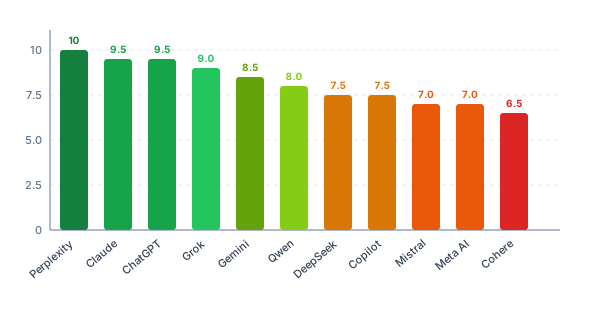
Furthermore, nearly every agent correctly implemented standard WPM calculation formulas, showcasing excellent logic when it comes to edge cases (like preventing division by zero or handling negative states during character deletion).
The true differentiator was UI/UX and DOM State Management. The highest-ranking models (Perplexity, Claude, ChatGPT) understood that a typing test is useless if the user cannot visually see where they are in the text. They flawlessly implemented blinking carets, text underlines, or background focus highlights. The lower-ranking models often nailed the math but failed the human element, leaving the user guessing where their keystrokes were landing.
In conclusion, while all of these models show incredible promise and can significantly bootstrap development, the top-tier models currently exhibit a much deeper understanding of human-computer interaction and visual state tracking.