The latest updates, strategies, and industry news from the world of online stores and digital commerce.

JPro Studio is happy to announce a new integration that greatly improves how AcyMailing works for Joomla users: AcyMailing Phoca Cart Integration.
This new package makes it much easier to create good-looking newsletters by letting you directly use your Phoca Cart products and categories within your AcyMailing email templates.
This integration helps you:
- Easily add Phoca Cart products and categories: Quickly put detailed product info, pictures, and links into your newsletters.
- Create focused campaigns: Send specific products to certain groups of people, which can help get more interest and sales.
- Save time: No more manual copying and pasting or complicated ways to get your store's content into your emails.
This new product from JPro Studio aims to connect your online store and your email marketing better. It makes it simpler than ever to reach your customers and increase sales.
For more details and to start using the AcyMailing Phoca Cart Integration, please visit the JP AcyMailing Phoca Cart Integration website.
- Details
- Category: Ecommerce
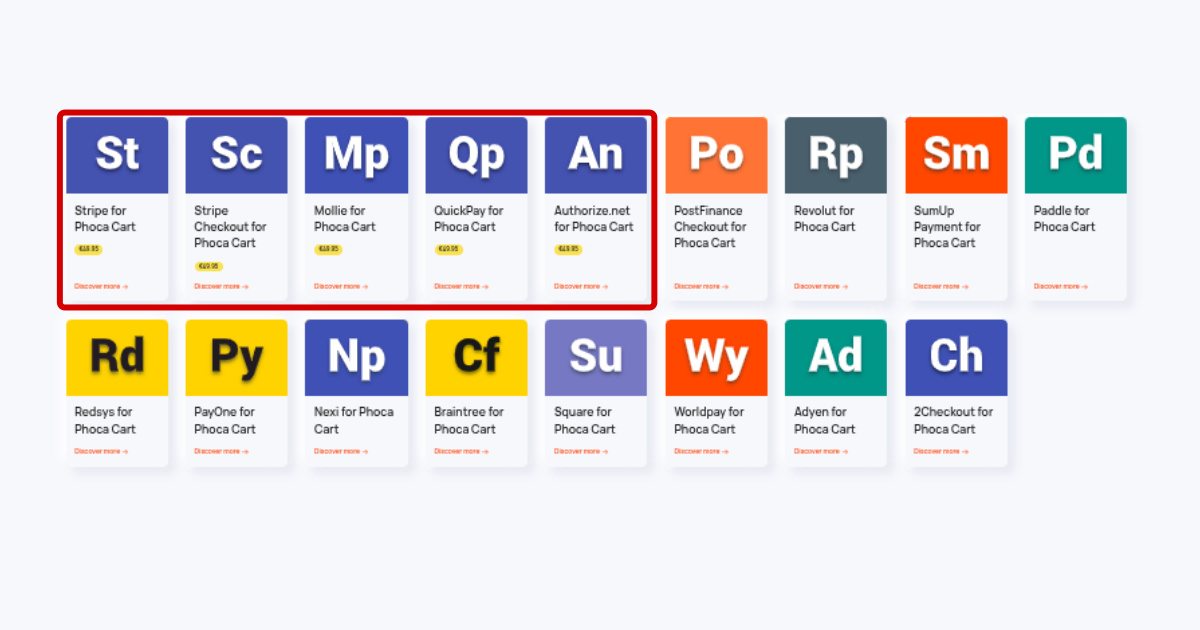
NorrNext has updated its portfolio, now offering 5 payment plugins for Phoca Cart, a popular e-commerce solution for Joomla. These plugins cover a variety of payment gateways, giving Phoca Cart users the ability to easily integrate different payment methods into their online stores.
All plugins can be found on this page: https://norrnext.com/ecommerce/phoca-cart
In addition to the 5 available plugins, NorrNext also offers custom plugin development, allowing businesses to request tailored solutions based on their specific payment processing needs.
The following payment methods can be created based on individual customer needs:
- PostFinance Checkout for Phoca Cart
- Revolut for Phoca Cart
- SumUp Payment for Phoca Cart
- Paddle for Phoca Cart
- Redsys for Phoca Cart
- PayOne for Phoca Cart
- Nexi for Phoca Cart
- Braintree for Phoca Cart
- Square for Phoca Cart
- Worldpay for Phoca Cart
- Adyen for Phoca Cart
- 2Checkout for Phoca Cart
- Details
- Category: Ecommerce
If you're running a multilingual online store, you know how challenging it can be to manage translations across your entire shop. From product names and descriptions to categories and attributes - translating everything quickly and consistently can save you time and boost your global reach.
Imagine this: Your client runs an online store using Phoca Cart. They arrive at a scheduled meeting and say: “You know, we’d like to expand our shop to support multiple languages. We'd like to add German and Italian alongside English.” You reply: “German and Italian, you say? One moment...” The client nods and adds: “Of course, we understand that building a multilingual store and translating everything - product names, descriptions, all the content - will take a long time. We’re prepared for that.” And you say: “Done! It’s already set up - while we were talking.”
Sounds too good to be true? This scenario can be completely real - thanks to two powerful plugins developed by n3t. They’re called Phoca Cart Console Plugin and n3t Translate Plugin. Watch the following video to see how they work.
Phoca Cart:
https://www.phoca.cz/phocacart
n3t Translate:
https://n3t.bitbucket.io/extension/n3t-translate/
Phoca Cart Console:
https://n3t.bitbucket.io/extension/phocacart-console/
Usage:
https://phocacart-console.readthedocs.io/en/latest/usage/#translate_10
Download Phoca Cart:
https://www.phoca.cz/download/99-phoca-cart/100-phoca-cart-component
- Details
- Category: Ecommerce
Users of Joomla and the Phoca Cart e-commerce extension often share their websites and ask questions on the Phoca Forum. This valuable feedback frequently highlights common errors they make when operating their online stores.
We've observed the following mistakes on the websites of users who referenced their sites while asking questions about Phoca Cart in the forum. These are just a few examples; if you've encountered other issues, please let us know so we can update this article.
These errors range from visual design flaws to content-related issues. Let's delve into some of them.
Design-Related Issues
1. Poor Product Photography
One of the most significant mistakes is investing time into building an e-commerce store but neglecting to create high-quality product photos. It's crucial to remember that your product photos are often the most important selling point on your e-shop. They are what truly sell the product.
In today's digital age, with readily available desktop and online tools for tasks like background removal, it's a huge missed opportunity not to utilize them. Your photos need to be appealing, and you should analyze whether the background should be part of the product image or not. For example, when selling furniture, it might be beneficial to show the product in a room setting to provide context. However, for smaller items, it's generally better to remove the background, allowing the product itself to stand out.
Often, removing the background and displaying the product in as much detail as possible is desirable. A distracting or unappealing background can draw attention away from the product. You can see the difference in the picture, where the left picture that shows the product in detail is much more interesting than the blurry picture with a distracting background.

2. Inconsistent Image Formats and Sizes
Always strive to have all your product images the same size and format (landscape or portrait). When each image has a different size, it looks unprofessional and unappealing. Dedicating extra time to preparing your e-commerce images is essential.
Inconsistent image formats and sizes make your product listings look disorganized.

If you have basic graphic editing skills, this doesn't have to be complicated. Here's an example using Inkscape:
- Create an image canvas in Inkscape, perhaps a 512x512px document.
- Remove the background from your product photos using an online service.
- Paste the product photo into your canvas and resize it as needed to ensure all products appear similarly sized.
- Export the image with a transparent background (PNG, WEBP) and then upload it to your system.
Following these steps will result in consistent, uniform images without distracting backgrounds, making your product listings look organized and increasing your chances of attracting customers.

3. Missing Shopping Cart Module
We've noticed some websites lack a visible shopping cart module. Users add items to their cart but have no visual confirmation or list of what's in their cart. It's recommended to display at least a shopping cart icon, typically in the top-right corner, visible on both mobile and desktop views. It's also good practice to display a notification that an item has been added to the cart, which Phoca Cart can do via a popup modal window.

A common issue is the lack of feedback after adding an item to the cart - no confirmation, no visible cart contents. Phoca Cart offers modules for this; it's wise to use them.
Once a user adds something to their cart, a modal box should appear with confirmation, and they should then be able to click on the cart icon to view their cart contents (e.g., in an off-canvas display).

4. Insufficiently Prominent "Add to Cart" Button
Sometimes, due to a poorly chosen template, crucial buttons like the "Add to Cart" button aren't prominent enough and might look more like highlighted text. Such buttons can confuse users and hinder the purchasing process.
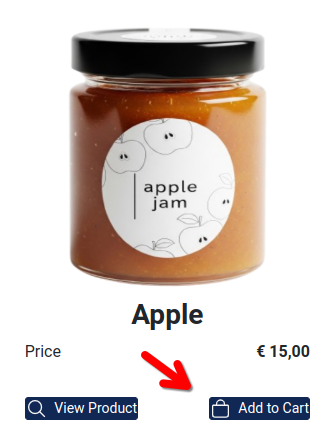
Always ensure your "Add to Cart" button clearly looks and functions like a button.
5. Overly Long Button Labels
In some languages, button texts can be excessively long, causing buttons to overlap. This is particularly common in German, where you might have two side-by-side buttons like "Produkt Anzeigen" (Show Product) and "In den Warenkorb" (Add to Cart).

When these buttons collide due to their length, it needs to be addressed. Several solutions are available:
- Use the latest Phoca Cart version, where buttons are aligned using Flexbox.
- Hide the text and display only an icon for the less significant button (Phoca Cart has a setting for this).
Design challenges can sometimes seem insurmountable, requiring an individual approach to find the best solution. For example, if you want two buttons aligned to the sides when they fit on one line, but centered and stacked when they don't. CSS Flexbox can handle displaying two buttons in a row and wrapping them to a new line if they don't fit. However, what it cannot do dynamically is change alignment (e.g., space-between when two buttons are on a line and center when there's only one). No CSS rule exists for this, so a compromise must be chosen individually for each website.
The following image shows center alignment when two buttons don't fit on a single line.

6. Missing Icons on Buttons
This usually happens due to a poorly chosen template that conflicts with standard icon fonts. Recent Phoca Cart versions default to SVG icons, so this problem should ideally no longer occur.

However, some sites still exhibit this issue. This can be easily solved. Install the latest version of Phoca Cart and select SVG as the icon type in the settings.
7. Inappropriately Chosen Color Scheme
Each industry often benefits from a specific color scheme. While exceptions exist where a seller uses a unique color palette, it's generally advisable to adhere to a color scheme for your website, logo, and marketing materials that is typical for your industry. If you're unsure, feel free to ask on the Phoca Forum; we're happy to provide guidance.
8. Double Popup Modals
When a customer adds an item to the cart, a modal popup window should appear. Some templates might load certain JavaScript and CSS libraries twice, leading to a duplicated modal.

You need to monitor this and either disable it in the template or replace the template entirely with a more modern and standard one.
9. Not Mobile-Friendly
Although most templates are responsive today, product displays on mobile devices might not always be correct. It's crucial to test your chosen template to ensure everything appears correctly on mobile. Phoca Cart also offers various settings, such as the number of columns for product display on mobile devices. Phoca templates also utilize mobile-friendly techniques for displaying menus, filters, carts, and more.

Content-Related Issues
1. Insufficient Product Descriptions
Product descriptions are a vital part of your e-shop, serving both your customers and search engines. Please remember to describe all your products thoroughly. If some products are similar, it's good to differentiate them using specifications, allowing customers to compare them easily. Detailed descriptions are crucial for customer decision-making and help them choose the right product.
2. Missing Stock Information
Customers need to know if a product is in stock or not before they can make a purchase. Clearly display stock availability for each item.
3. Poor Website Navigation
Complicated or confusing navigation makes it difficult for users to find what they are looking for. Try to simplify your navigation and include only the most important links in your menu, so customers aren't confused and can quickly get to where they need to go. Always be sure that whatever page the user is on, there will be main e-shop link available.
4. Not Having a Clear Return/Refund Policy
Customers may hesitate to buy if they're unsure about your return or refund process. Provide a clear, easy-to-find return and refund policy that reassures customers about their purchase.
5. Not Engaging with Customer Feedback
Ignoring customer reviews, questions, and feedback can harm trust and repeat business. Regularly monitor reviews, respond to customer questions, and make adjustments based on feedback. Always put visible sections on the page where customers can contact you or ask about a specific product.
6. More information on delivery and payment methods
Even if customers see the correct delivery and payment methods in the checkout, it is certainly good to have a section where you describe these methods comprehensively. So that the customer has the opportunity to find out this information before making a purchase.
If you want to successfully sell your products online, your e-shop should definitely avoid design and content errors. You should pay close attention to your product photos to ensure they appeal to your potential customers.
If you're using Joomla and Phoca Cart and encounter any design or other issues on your website, don't hesitate to ask in the Phoca Forum. Most problems can be resolved with a bit of guidance. The same applies if you think of any other mistakes now, please let us know and we will update the article. Thank you.
- Details
- Category: Ecommerce
Phoca Cart has recently unveiled its highly anticipated version 5, a major update packed with a range of new features and improvements designed to enhance both functionality and user experience for online store owners. This release brings significant upgrades across multiple aspects of the e-commerce platform, from visual design to technical performance. Here’s a rundown of the most noteworthy features in Phoca Cart 5.
1. Dark Theme Support
Phoca Cart 5 introduces full dark theme support, making it visually compatible with dark mode settings both in the frontend and the administration panel. This update caters to modern user preferences, allowing online store owners and their customers to switch to a sleeker, eye-friendly interface that works seamlessly in dark mode.
2. Watermark and AVIF Support
In terms of image handling, Phoca Cart 5 adds support for watermarks and the AVIF image format. Following the earlier adoption of the modern WEBP format, Phoca Cart now also supports AVIF, a format known for its superior image compression. Additionally, store owners can now apply watermarks to their product thumbnails, ensuring brand protection and image quality.
3. SQL Query Optimization
Phoca Cart 5 introduces enhanced SQL query optimization, significantly improving performance for large stores with tens of thousands of products, thousands of categories, and hundreds of thousands of orders. While product list queries typically use pagination and were not a performance issue, we focused on optimizing category lists, especially when loading them into trees. This area saw the most significant improvements.
4. Advanced Product Batch Processing
If you use the batch function to copy products and duplicate entire products or just some of their properties, you'll be pleased to know that product batch processing has been significantly expanded with many additional parameters. In Phoca Cart 5, the options for selecting what to include when copying a product have been significantly expanded.
5. New Multilanguage Feature
The latest release of Phoca Cart 5 introduces a major innovation: a brand-new multilanguage feature designed to overcome the limitations of previous multilingual support. In earlier versions, Phoca Cart supported the standard Joomla core multilanguage system and external extensions. However, these solutions had some drawbacks. External extensions lacked full plugin support, while Joomla’s core multilanguage feature was not ideal for e-commerce. Joomla’s core multilanguage feature system assigns a new database ID for each language variant, leading to challenges such as separate stock management for the same product in different languages. To address these issues, Phoca Cart 5 introduces a completely new multilanguage system that operates on the database layer. This solution is significantly faster, more efficient, and eliminates the previous limitations. Additionally, Phoca Cart 5 now supports the n3t Language Filter extension, which is especially useful for handling parameters stored in global settings.
6. Back in Stock Notification
For online stores with popular products that occasionally run out of stock, Phoca Cart 5 now includes a Back in Stock Notification feature. Customers can sign up for alerts to be notified as soon as a product they are interested in becomes available again, helping to maintain customer interest and reduce lost sales.
7. Schema.org Support
In response to the growing importance of structured data for SEO, Phoca Cart 5 introduces support for Schema.org markup. This feature allows store owners to integrate rich product data directly on product pages, which can improve visibility and enhance search engine optimization. Enabling Schema.org support through the Phoca Cart options ensures products are properly indexed with relevant metadata.
8. Joomla Mail Templates Integration
Joomla 5.2 introduced the Mail Template Layout feature, which Phoca Cart 5 now takes advantage of for sending emails. This feature allows for greater flexibility in managing email templates by enabling the creation of custom layouts. It not only provides the ability to design personalized templates, but also introduces the option to send various multilingual versions of emails. With this improvement, it’s easier to manage both the presentation and language options for outgoing communications.
9. New Payment and Shipping Plugins
Phoca Cart 5 expands its payment and shipping options with a selection of new plugins. These additions provide greater flexibility for store owners when configuring payment gateways and delivery methods, helping them accommodate a broader range of customer preferences and requirements.
10. New Templates
Phoca Cart 5 introduces seven new templates, offering both child templates for the core Joomla Cassiopeia template and standalone templates designed for unique store designs.
New child templates for Cassiopeia:
- Phoca Cart Toys Child Template
- Phoca Cart Tools Child Template
- Phoca Cart Furniture Child Template
- Phoca Cart Beauty Child Template.
These child templates provide flexibility while maintaining compatibility with the default Joomla Cassiopeia template.
Standalone Templates:
- Phoca Cart Premiere Template
- Phoca Cart Horizon Template
- Phoca Cart Gourmet Template.
These three standalone templates stand out for their simplicity and efficiency. What makes them particularly unique is that they do not rely on any external frameworks, yet they offer the same powerful features as framework-based templates. For instance, users can switch to dark mode, customize the layout with additional rows or columns for different module positions, and more—all of which can be set directly within the template settings.
Despite the introduction of these new templates, Phoca Cart continues to support popular template frameworks such as YOOtheme, Gantry, Helix, T4, Astroid, Sparky and others. Phoca Cart output is available in the latest versions of Bootstrap or UIkit. UIkit is specifically used for YOOtheme templates, with full support for the latest YOOtheme Pro. Very interesting extensions are currently being created for this framework, such as PCUikit and others.
Looking Forward to Joomla 6 Compatibility
Phoca Cart 5 is fully optimized for Joomla 5, but it also prepares for future compatibility with Joomla 6. The codebase is being fine-tuned to ensure seamless integration with upcoming Joomla versions, ensuring that Phoca Cart will continue to deliver excellent performance as Joomla evolves.
Conclusion
Phoca Cart 5 represents a major step forward in enhancing the performance, customization, and functionality of online stores powered by Joomla. From dark theme support and image optimization to a revamped multilanguage system and new templates, this update introduces numerous features that will greatly benefit store owners looking to improve their e-commerce operations.
The development and testing process for Phoca Cart 5 involved contributions from a large community of developers, testers, and translators, with over a hundred beta versions released. The Phoca Cart team expresses its gratitude to everyone who supported the development, from contributing code and translations to providing valuable feedback.
With its robust set of new features, Phoca Cart 5 is set to deliver a faster, more flexible, and more powerful e-commerce solution for Joomla users.
- Details
- Category: Ecommerce