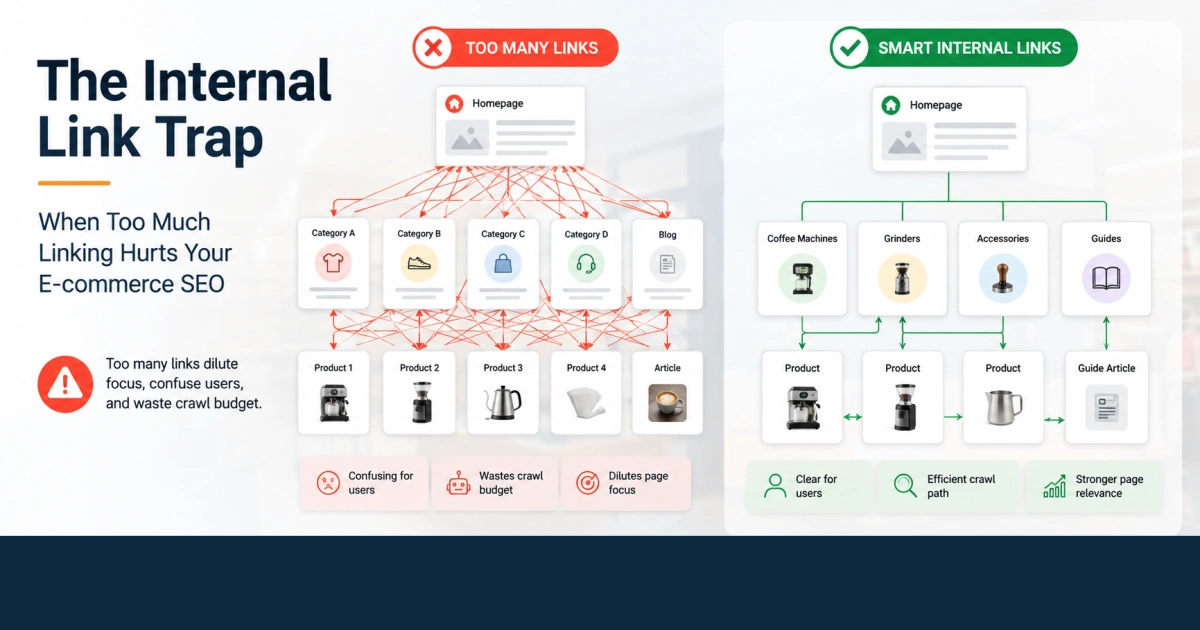
Building a clean internal linking structure sounds simple until an e-commerce site starts getting bigger. A few categories turn into dozens, products multiply, blog content keeps growing, and suddenly almost every page seems like a good place to add another link.
That is where things can get messy.
The goal of internal linking is not to create as many connections as possible. It is to create useful connections that help shoppers move through the site and help search engines understand which pages matter.
This becomes especially important on CMS driven stores. Whether you are running Joomla with Phoca Cart, WooCommerce, Shopify, Magento, or another platform, your CMS can make it incredibly easy to create links, related product blocks, menu items, tags, filters, and category connections. Easy does not always mean strategic.
Understanding Link Equity and Link Density
Internal links help distribute authority throughout your website and give search engines additional context about the relationship between pages.
A category page might point to important product collections. A product page might link to a relevant accessory. A buying guide might link to several products that actually solve the problem discussed in the article.
That is useful.
The problem starts when every possible relationship becomes a link.
The Concept of Link Dilution
Imagine an important category page for premium coffee machines. You want your strongest content to support that page and your most valuable products.
Now imagine that dozens of pages link to it simply because your CMS automatically inserts related categories, tags, product widgets, manufacturer links, and other navigation elements.
The issue is not that Google sees a certain number of internal links and automatically applies a penalty. There is no magic internal link limit where SEO suddenly stops working.
The real problem is strategic.
When a page contains a huge number of links, the important ones become harder to distinguish from the generic ones. Users have more choices, site architecture becomes harder to understand, and your strongest topical relationships can get buried.
This is particularly easy to create in a CMS because features designed to improve usability can also create a huge number of connections across the site.
Quality Over Quantity in E-commerce
For an online store, the value of an internal link depends heavily on context.
A link from a page about summer dresses to a collection of linen trousers makes sense if the products genuinely belong to the same shopping journey.
A link from that same page to industrial pipe fittings does not suddenly become useful because the CMS allowed you to connect the products.
Think about the intent behind the link.
Would a customer realistically click it?
Does the destination page expand on the topic?
Does the connection help the user make a decision?
Does it reinforce the structure of your store?
If the answer is yes, the link is probably doing its job.
If the only reason for the link is that the platform makes it easy to generate, it is worth questioning.
Identifying When Linking Becomes Counterproductive
Knowing when to stop linking is just as important as knowing where to start.
User Experience Breakdown
A product page with a handful of highly relevant recommendations can be extremely helpful. A product page surrounded by dozens of related categories, accessories, brands, tags, and automatically generated links can feel more like a database than a store.
Consider a Phoca Cart product page selling a professional coffee machine.
Linking to compatible grinders, coffee filters, accessories, and a relevant coffee machine category is useful. Linking to every imaginable product attribute, manufacturer page, tag archive, filter combination, and loosely related product creates noise.
The customer should understand where to go next without having to decode the site's architecture.
Your goal is to guide the shopper, not expose every possible path the CMS can generate.
Crawl Efficiency
Large e-commerce websites can contain thousands or even millions of URLs, especially when faceted navigation, filters, sorting parameters, tags, and search pages are involved.
Internal links contribute to how search engines discover and revisit those URLs.
That does not mean every extra link automatically wastes crawl budget. The bigger concern is allowing your site to create a large number of low value or unnecessary URLs that keep getting surfaced through internal navigation.
This is another area where CMS configuration matters.
A technically flexible system can generate many pages that are useful for users in some contexts but provide little independent SEO value. The solution is not simply to remove links. It is to decide which parts of the architecture deserve to be prominent and which should remain secondary.
Diluting Page Focus
Every important landing page should have a clear job.
A category page targeting premium coffee makers should primarily help users discover and evaluate premium coffee makers.
It can link to grinders, accessories, guides, and related categories, but those links should support the main topic rather than compete with it.
This is where carefully planned site architecture beats automatic linking.
A Practical Example in Joomla and Phoca Cart
Consider a Joomla store using Phoca Cart with a few hundred products.
You might have a structure like:
Coffee Machines
Automatic Coffee Machines
Semi Automatic Coffee Machines
Professional Coffee Machines
Coffee Machine Accessories
That hierarchy already tells users and search engines something useful.
Now imagine adding a blog article called "How to Choose a Professional Coffee Machine for a Small Café."
A strong internal linking strategy could connect the article naturally to the Professional Coffee Machines category, a few relevant products, and perhaps a guide about grinders.
You do not need links to every coffee related product in the catalog.
You also do not need every product page to link to every category simply because those relationships can be configured in the CMS.
The same principle applies outside Joomla. WooCommerce, Magento, Shopify, and other platforms all give you powerful tools for creating related products, categories, navigation menus, filters, and automated recommendations.
Use those features to reflect your information architecture, not to replace it.
Practical Steps for Your Store This Week
Audit Your Top Performing Pages
Start with your most important category and product pages.
Look at the internal links they contain and ask a simple question: does each link help the user continue the journey?
For example, a best selling espresso machine could reasonably link to compatible grinders, replacement filters, accessories, and the main espresso machine category.
It probably does not need a long list of unrelated product categories just because those categories exist in your CMS.
Review Automatically Generated Links
This is one of the easiest places to find unnecessary linking.
Check your CMS menus, related product modules, tag pages, manufacturer links, category widgets, breadcrumbs, filters, and other components that automatically generate internal links.
Do not remove useful navigation just to reduce the number of links.
Instead, identify places where the system is generating connections that have little value for either users or search engines.
Strengthen Contextual Links
Your best internal links often exist inside the actual content.
Suppose an article explains how to choose a coffee machine for a small restaurant. A natural mention of "professional coffee machines" can link directly to the relevant category.
That is much more useful than adding ten generic "related products" links underneath the article.
Context tells the user why the destination matters.
Build Clear Link Hierarchies
Think about your store like a physical retail space.
Your main categories are the major departments. Subcategories are the shelves. Product pages are the individual products.
Your navigation should make that relationship obvious.
Then use contextual links to create useful shortcuts between related sections.
The CMS should support this structure rather than dictate it.
Check Your Important Pages From the Top Down
Pick a few pages that matter most commercially.
Then work upward and downward through the site.
Can users reach the page from an important category?
Do relevant guides link to it?
Does it link back to its parent category?
Are related products genuinely related?
Are important pages buried underneath dozens of low priority links?
This exercise often reveals structural issues much faster than looking at the total number of internal links.
Conclusion: Precision Over Volume
Internal linking is not about hitting a perfect number of links per page.
It is about creating a logical system where important pages are easy to discover, relevant topics are connected, and users always have a sensible next step.
Modern CMS platforms make this both easier and harder.
Joomla with Phoca Cart, for example, gives store owners plenty of ways to connect products, categories, manufacturers, and content. That flexibility is valuable, but it also means you need to control the architecture instead of simply accepting every automatic relationship the system can create.
The best internal linking strategy is not the one with the most links.
It is the one where every important link has a reason to exist.
Focus on relevance, hierarchy, context, and the customer's journey. When those four things are right, your internal linking structure starts working as part of the SEO strategy instead of becoming another layer of noise.