Engaging articles, helpful advice, and behind-the-scenes thoughts on web development, CMS platforms, and digital trends.
In this article, we’ll explore how artificial intelligence can be integrated into a CMS environment - specifically Joomla CMS - to create complete websites quickly and flexibly. We’ll also walk through a demonstration where AI is used to generate two different websites inside Joomla. This article is intended primarily as inspiration and as a starting point for discussion about the possible directions Joomla CMS could take when working with AI. The system shown here is just one of many potential ways AI and a CMS could collaborate.
Watch the video below to see how Joomla CMS, together with several specialized extensions, could be used to build two example websites from start to finish.
As we mention in the video, an important aspect of combining AI with a CMS is that creating a website with AI is only the first step. We also need to be able to modify the site, make adjustments, add new features, or integrate ready-made solutions. This is where the CMS plays an irreplaceable role.
The Tools We’ll Use
Alongside Joomla CMS itself, we’ll be using three key extensions from Phoca:
- Phoca AI Component - a component that connects Joomla to AI models and helps generate both content and design.
- Phoca AI Template - a Joomla template serving as the base for all generated layouts.
- Phoca Particles Module - a module for creating individual Joomla modules systematically.
The Test Prompts
For our demonstration, we’ll give AI two different prompts:
1. Software Developer Website
"Freelance software developer. There will be a comparison table with three main pricing plans: Basic, Standard, and Pro. The site should include menu links like Portfolio, Services, and Contact. The developer is called 'Spectrum' and offers software development. The page should contain bold colors."2. Restaurant Website
"Restaurant website that specializes in selling pasta, pizza, fish, and salads. There should be menu links like Menu, Order Online, and Find Us."In each case, the prompt is sent to the AI, which then generates the website directly inside Joomla - complete with initial layout, structure, and styling.
The Role of the CMS
AI gives us a strong starting point by generating the basic structure and design. The CMS - in this case Joomla - then takes over as the main platform for editing, expanding, and integrating specialized extensions for specific needs.
This collaboration between AI and CMS can take many forms:
- Single Prompt for the Entire Website
Simple to set up, but harder to fine-tune individual sections. - Chat-based Editing
A conversational approach that allows precise control over each element, but requires more computing resources. - Multiple Prompts for Individual Sections
Useful for Joomla page builders - each block or section could have its own tailored prompt for maximum flexibility.
Choosing the Right Environment
The environment in which the CMS runs plays a crucial role. The setup shown in our demo is best suited for a SaaS-type environment, because it relies on three different technologies working together:
- PHP, Apache, SQL, JavaScript (browser) - the CMS backbone.
- Node.js - server-side JavaScript, used here mainly for compiling and optimizing assets.
- Python with Flask - for communication with local AI models.
Such an environment is rarely available on typical shared hosting. However, all is not lost - Node.js could be replaced by PHP for certain tasks, and AI queries could be sent to external services. With the right adjustments, this system could run even on shared servers.
Technical Breakdown of the Demonstration Setup
To replicate what you see in the video, the following would be needed on a single server or machine:
- Apache - serving PHP and MySQL.
- PHP - core CMS logic.
- MySQL/MariaDB - database storage.
- JavaScript - a bridge between PHP and Python; PHP assembles prompts, sends them to JS, which forwards them to Python (Flask), then processes and stores responses.
- Node.js - a simple tool for compiling SCSS and JavaScript, minifying files, gzipping, and generating RTL versions.
- Python with Flask - handling communication with local AI model.
Design Flexibility
Design is one example where a CMS can help us be more flexible.
While AI tools might allow us to change the design only through prompts, combining AI with a CMS opens up more possibilities:
- Not only through prompts
- But also by adjusting SCSS variables and recompiling CSS files
- Or overriding styles in a user.css file directly from the template
- Or Using built-in template parameters (a common feature in Joomla templates)
- And more.
All of this gives us a wider range of options and greater flexibility.
AI vs. Pre-Prepared Assets
A key decision is deciding what to let AI create from scratch and what to base on pre-prepared datasets.
Example: Color Schemes
Do we allow AI to generate colors freely, or do we supply professionally designed palettes and let AI choose the most appropriate one?
Example: Images
We can let AI generate them, or we can provide a curated dataset. However, in most real-world cases - such as restaurants - custom photography is essential. A restaurant will almost always want to feature images of its actual interior and dishes rather than entirely AI-generated visuals.
Conclusion
The integration of AI into a CMS like Joomla opens up exciting possibilities for rapid website creation. Whether you opt for fully automated generation or a hybrid approach with human-curated assets, the combination of AI’s creative speed and Joomla’s customization power can significantly accelerate the development process while maintaining full creative control.
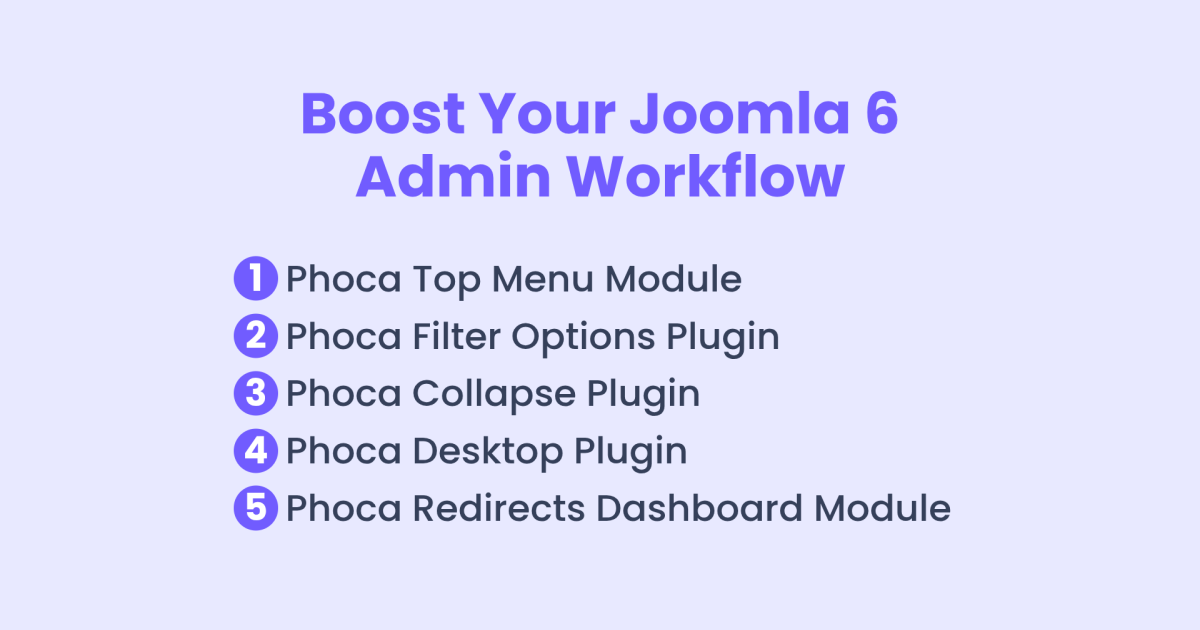
Manage a Joomla website more efficiently and faster. We'll go through five helpful administration extensions - plugins and modules - that can make working in the Joomla admin area easier and more pleasant.
Phoca Top Menu Module
Let’s start with the Phoca Top Menu module. This module adds a top menu bar for desktop users, where an alternative Joomla menu can be displayed. For many users, this can offer a clearer and more structured navigation. Besides better structure, it also speeds up work on desktop, since the menu items are much easier to access.
Phoca Filter Options Plugin
Next, let’s take a look at the Phoca Filter Options plugin. When working with long lists of settings in Joomla, finding a specific option can sometimes take a lot of time. This plugin makes that easier. It adds a filter that helps quickly locate parameters within larger configuration panels. This makes extension setup faster, as it’s possible to jump straight to the needed setting.
See: Phoca Filter Options plugin
Phoca Collapse Plugin
Then, there’s the Phoca Collapse plugin. It’s especially useful when working with settings that use subforms containing many fields. In such cases, it can be difficult to organize or reorder individual subform sections. This plugin allows less important details to be hidden, so the item becomes easier to manage. It makes it much simpler to sort or rearrange parts of the subform without being distracted by too much information.
Phoca Desktop Plugin
Now, let’s move on to the Phoca Desktop plugin. This plugin makes it possible to create custom shortcuts right on the Joomla administration dashboard. These shortcuts can point not only to main sections, but also to specific actions - for example, 'Add New Article' or 'Add New Menu Item'. It’s a great way to speed up access to frequently used tasks. This can be helpful for administrators, and also for clients, who can get direct access to the actions they use most, without needing to go through the full menu structure.
See: Phoca Desktop plugin
Phoca Redirects Dashboard Module
Finally, there’s the Phoca Redirects Dashboard module - a useful tool for situations where automatic features run in the background and are easy to forget. For example, Joomla’s Redirect plugin can be used to track 404 error URLs, but if it’s left active for a long time, it may collect large amounts of data - often from bots. This module adds a warning to the admin dashboard when the number of saved URLs reaches a set limit. It serves as a reminder that the Redirect plugin is active, and helps prevent the database from becoming overloaded, which could affect site performance.
See: Phoca Redirects Dashboard module
Be sure to try some of these extensions to make managing the Joomla administration easier, more efficient, and faster.
Recently, Joomla! 8 - The future is planned now article was published in the Joomla Community Magazine.
It talked about Joomla 8 and the planning process behind its future development.
The article also invited community members to share their feedback and ideas for the upcoming version.
As a developer, I work with Joomla every day.
I hear a lot of feedback from users - what helps them, what slows them down, and what they wish was better.
In this video, I’ll share a few ideas based on real user feedback - simple ways to make the Joomla admin faster and easier to use.
1) Ajax Save → Save Instantly with Ajax
Let’s start with saving items - and we’ll use file editing as an example. Imagine you're editing a file and working on a specific line. You click Save and then switch to the frontend to see how the change looks. But after saving, the editor scrolls back to the top. You lose your place - and you have to scroll back down every single time. It’s a small thing, but it quickly becomes annoying and breaks your focus.
With Ajax saving, that doesn’t happen. The page stays where it is, the save is faster, and you can stay focused on what you’re actually doing. And it’s not just about editing files - the same applies when you're adjusting article settings, editing module parameters, or working with any other content.
2) Ajax Actions → Quick Actions via Ajax
The same thing happens with almost any other action. Every time the page reloads, we lose our focus - and it takes a moment to figure out where we were. With Ajax-based actions, that’s no longer an issue. Everything feels faster and simpler - but more importantly, we stay in control. There’s no interruption, no need to refocus. We can just keep working.
3) Edit in Place → Edit Content Inline
Just like Ajax saving, inline editing can make a big difference. Let’s say we want to quickly change the position of a module. Right now, we have to open the module list, click into the specific module, and change the position manually. If you need to update several modules, it becomes time-consuming and repetitive.
With edit in place, you could simply change the position directly from the module list - no need to open each item. And of course, this applies to many other items that often need quick edits. It’s a small change, but it saves a lot of time and makes the whole process much smoother.
4) Faster Access to Some Sections → Speedier Navigation to Key Sections
Another area that could be improved is faster and clearer access to certain sections. Let’s take the extension installation as an example. Right now, it takes two clicks instead of one - which isn’t a huge issue by itself. But the real challenge is for new users. When they click on the System menu, they see a long list of links to different sections all on one page. This can be overwhelming and confusing for beginners.
It takes them a while to find their way around, simply because there are too many options displayed at once. So this is definitely something to think about - maybe there’s a simpler, more user-friendly way.
5) Unobtrusive, but Still Accessible Help → Subtle, Accessible Help When You Need It
Inline help is another place where small changes could make a big difference. Imagine you find a setting you need to adjust, but there’s no simple explanation nearby. You click the inline help button, but instead of getting a quick description, you lose your focus completely. That breaks your concentration and interrupts your workflow.
This can be solved easily - for example, by showing help text in tooltips. If you’re an experienced administrator, the help won’t get in your way or clutter the form fields. But if you really need guidance, just hover over the setting and the explanation will appear right there. The key is that you don’t lose focus - nothing interrupts your concentration.
Conclusion
These are some really interesting insights that show us how to work more comfortably and efficiently in the Joomla administration - without anything getting in the way or interrupting our flow.
Updated by users
6) Displaying tags in article list
Displaying tags or other relevant information associated with an article in the article list is also an important feature. When browsing through the list of articles, it allows users to quickly get an overview of which articles are linked to specific topics, keywords, or other relevant data. This feature enhances navigation and helps users identify connections between different pieces of content at a glance.

This article is a continuation of the previous article: Inkscape - Remove Image Background (AI) Extension.
If we already have a background removal environment for images (rembg library and Inkscape plugin Phoca - Remove Image Background (AI)), then we can simply create other different effects in Inkscape.
One such effect might be to insert text behind an object in a raster image. All can be seen in this video:
The principle is very simple. We make a copy of the main image. On the copy, remove the background according to this tutorial: Phoca - Remove Image Background (AI) and add text. So we will have three layers:
- the main image
- a copy of the image without the background
- text
Now we just need to move the text layer between the main image layer and the copy image layer.
Phoca - Remove Image Background (AI) extension is an Inkscape extension to help you easily remove backgrounds from raster images (JPG, PNG, WEBP, ...) using AI and the Rembg library.
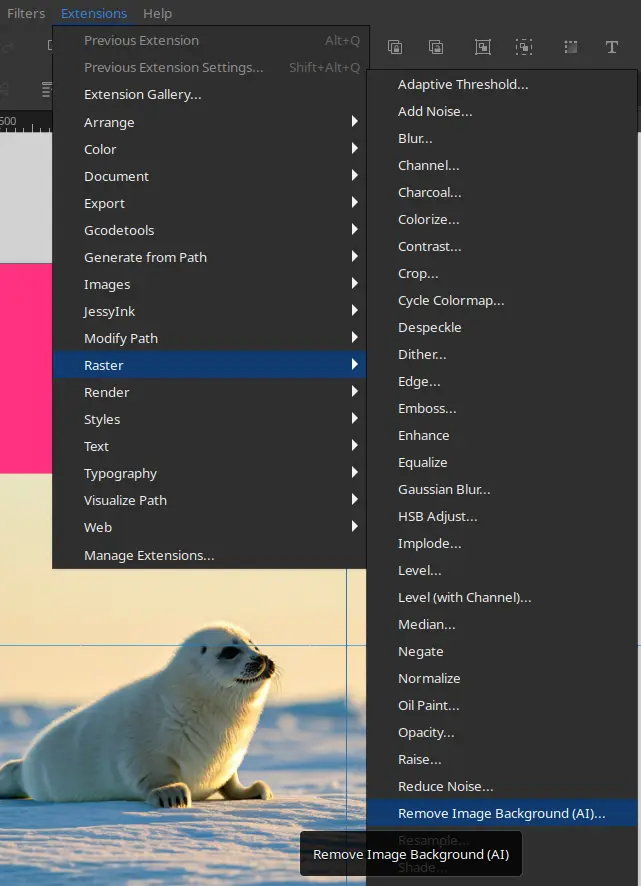
With Phoca - Inkscape Remove Image Background extension you can remove image background with help of different AI models. There are following options:
- Model - select model
- Post Process Mask - Yes | No
- Alpha Matting - Yes | No
- Alpha Matting Foreground Threshold - set value for Alpha matting foreground threshold (0 - 255)
- Alpha Matting Background Threshold - set value for Alpha matting foreground threshold (0 - 255)
- Alpha Matting Erode Size - set value for Alpha matting erode size (0 - 40)
- Debug
Usage
- Make sure you have your Rembg library environment set up correctly on your computer, see Be aware section below.
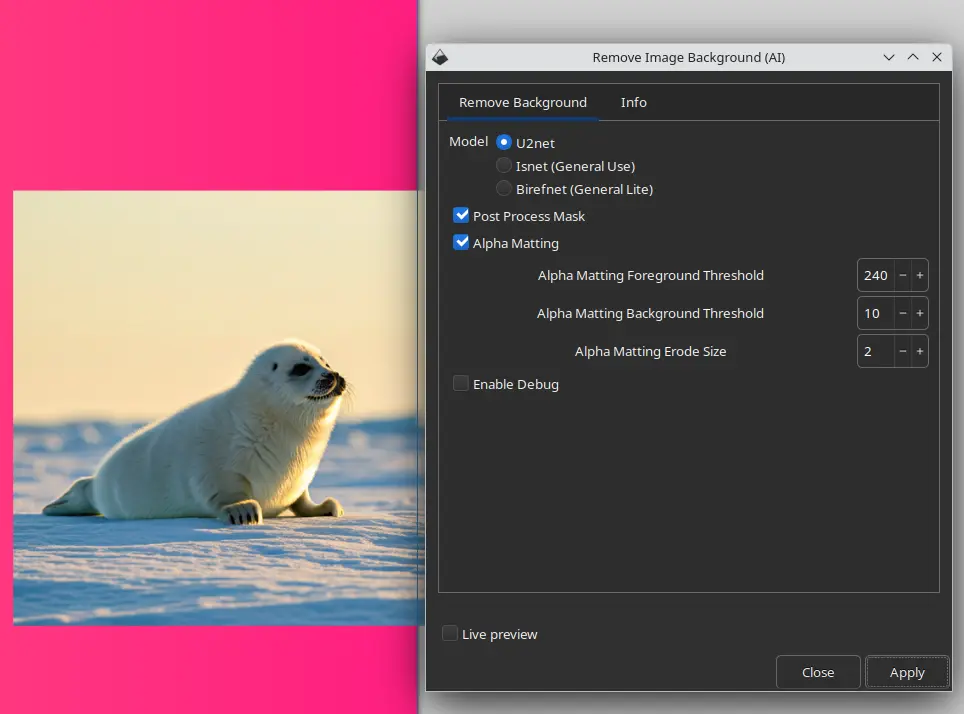
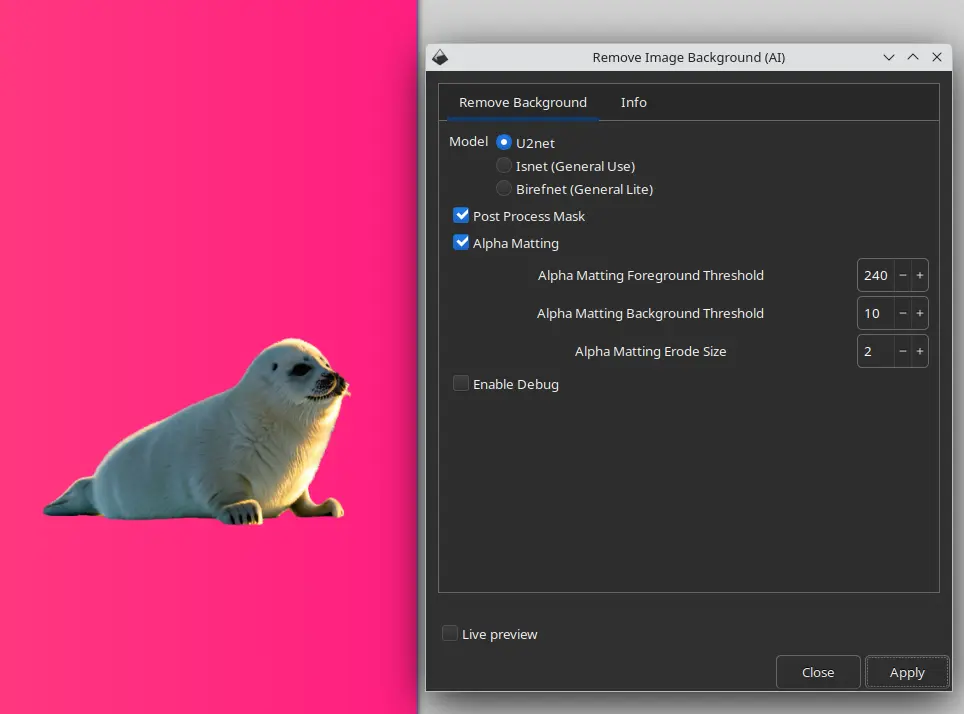
- Select raster image, click on Raster - Remove Image Background. Set options and click on Apply button.
- Then the selected image should have its background removed using AI.
Be aware
- This extensions requires Rembg and PIL libraries (and their dependencies) installed on your system, see: https://github.com/danielgatis/rembg
- This extension is for experienced users who have set up and tested the Rembg - a Python library on their computer.
- Removing image backgrounds using AI models can be a very challenging process. Therefore, it is a good idea to have your environment set up correctly and try first to remove the background of an image using the Rembg library directly in the console
How to install this extension
Just follow Inkscape guides for installing Inkscape extensions (download the ZIP package and unzip it to Inkscape extension folder and restart Inkscape)
This extension needs the Python libraries Rembg and PIL and many of their other dependencies to run properly. So before using this extension, you need to install this complete environment using Python.
- Optimizing Image Background Removal with AI Models
- Welcome to Joomla, Dear WordPress Users: A Comprehensive Guide to Joomla’s Strengths
- WordPress Alternatives in 2024: Exploring the Best CMS Options
- How to Install Phoca Premiere Template Together with Demo Data
- Book Review - Developing Extensions for Joomla! 5