In our previous article, Connecting AI and CMS: Building websites with AI and maintaining it in Joomla CMS, we mostly presented a vision of integrating artificial intelligence with content management systems. Today, we are following up on that vision with exciting news: we now have a complete component available in Alpha version!
Vision:
We have successfully removed two major obstacles that previously hindered the process: the necessity to use Node.js and the restriction of using only a local model.
As a result, Phoca AI can now be used on any Joomla 6 instance. However, before you install Phoca AI, we must emphasize that it is currently in Alpha version and has not yet undergone complete security audits. Therefore, it is highly recommended to test it on a localhost environment.
Alpha version:
How to test?
Install the following extensions:
- Phoca AI component
- Phoca AI template (this package also includes the Phoca Particles module)
and copy demo images (optional) - you can copy the images that serve as demo content when generating websites. Please note: this is not a standard Joomla installation package. It is a regular zip archive that must be extracted and copied directly to the root of your Joomla installation (the package contains a directory tree, meaning the images will be automatically copied to the images/phocaai folder).
You can download all ZIP packages on Phoca AI download website.
It is also important to mention that we are just at the beginning of our journey. Since this is an Alpha version, not all the necessary data is complete yet. Whether we are talking about the list of categories, structures, rules or styles. These will be created and added gradually over time.
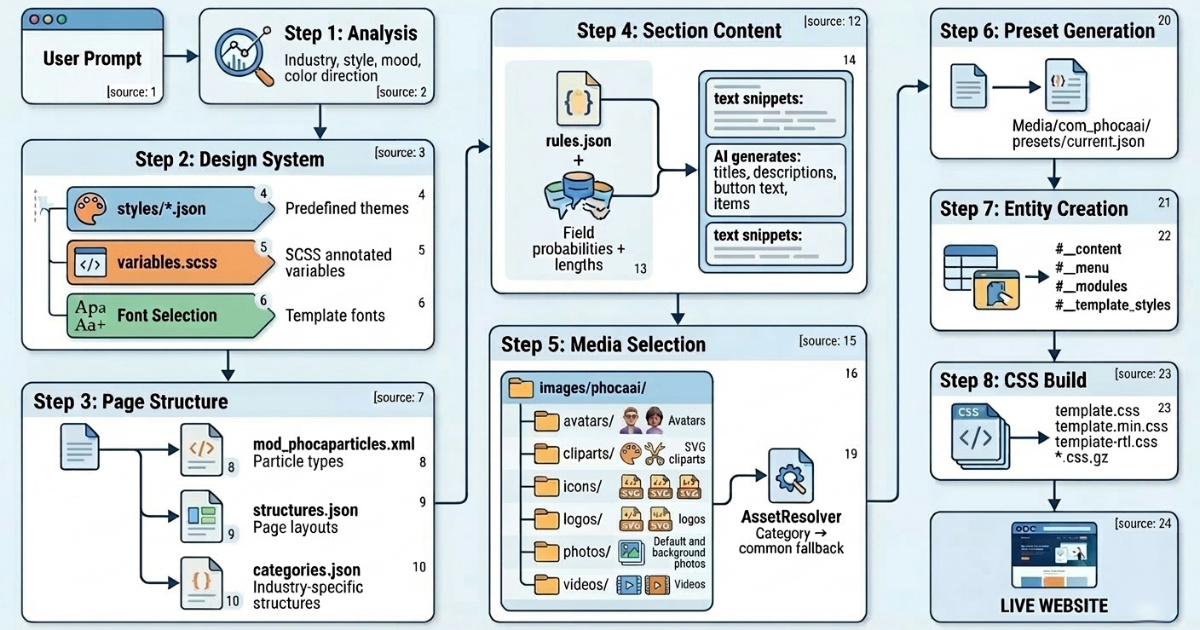
In the following image, you can see how Phoca AI works:
Generating your first page
If you have successfully installed the Phoca AI component, the Phoca AI template, and the Phoca Particles module, go to Options within the Phoca AI component. There, set the path to your local model, or select an external model and enter your API key. Now, navigate to the Generate section, where you can enter a prompt and let the AI create a page for you.
Recommendation: It is always a good practice to start with a clean installation of Joomla. Furthermore, make sure to clear any existing demo data before each new generation.
Once you create a page you like, you can save it as a preset and load it again at any time (in presets view). All the generated content is displayed via standard Joomla modules (specifically the Phoca Particles Module). This means that if you need to make adjustments, you simply go to the module list, find the respective module, and edit it just like you normally would in Joomla.
Join the Testing and Feedback
We are excited to see what you create with Phoca AI. However, please remember that as an Alpha release, your feedback is crucial for us to move toward a stable version.
If you decide to test this component and encounter any bugs, or if you have suggestions for new features and improvements, please let us know. You can post your feedback, bug reports, or questions in the Phoca Forum.
Thank you for being part of this journey and for helping us shape the future of AI in Joomla.