
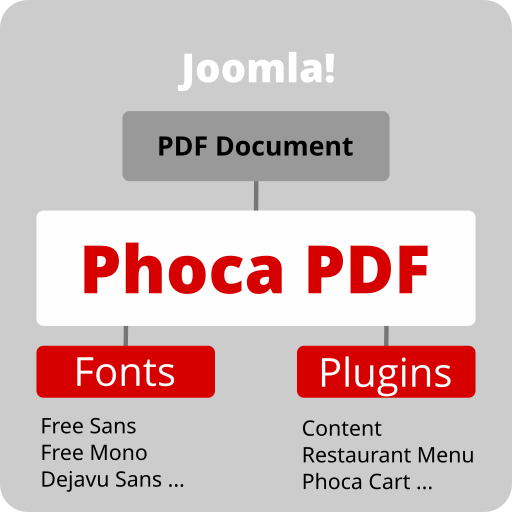
The whole Phoca PDF framework contains:
- Phoca PDF component
- Phoca PDF fonts
- Phoca PDF plugins
Phoca PDF component uses TCPDF library for creating PDF documents. After installing the component, you also need to install a plugin for special parts of the system. For example: Phoca PDF content plugin for articles, Phoca PDF Phoca Cart plugin for creating invoices in Phoca Cart, Phoca PDF Restaurant menu plugin for creating PDF with daily or weekly menus, etc. There is also a special system plugin that tries to find the right place in the article and create visible button to print a PDF document.
There is one font included in Phoca PDF component but you can install other Phoca PDF fonts (fonts contain large files so they are not included in core Phoca PDF component installation package). Fonts are TCPDF fonts, therefore, there is no limit and it is possible to install any font.
Requirements:
- Joomla 1.5, 2.5, 3, 4, 5, 6 or any later version
- PHP 5, 7, 8 or any later version (see current Joomla requirements).
Important notice:
- You can set footer or header information with help of HTML text editor, but be aware because not all HTML tags and attributes, which an editor produces, are supported
- HTML code of your documents should be valid
- You can set different parameters for your PDF document, so after setting these parameters you should test creating of your PDF documents because of possible conflicts caused by setting some extra values (e.g. setting of small PDF format vs. large font size vs. large line height, etc...)
- You can set different font types for different parts of document (content, header, footer) but be aware, because PDF document stores information about font types. UTF-8 fonts are supported and after storing information about all font types, the size of PDF document can increase significantly.
- PDF is not like HTML. A PDF is a static document, while HTML is a dynamic document. Therefore, it is necessary to take this into account and know that not all dynamic HTML elements can be displayed in a PDF document.
Available plugins:
| Name | Requirement | Status |
| Phoca PDF Content plugin | Joomla CMS, Phoca PDF component with installed fonts | Active |
| Phoca PDF Restaurant Menu plugin | Joomla CMS, Phoca PDF component with installed fonts, Phoca Restaurant Menu component | Active |
| Phoca PDF Phoca Cart plugin | Joomla CMS, Phoca PDF component with installed fonts, Phoca Cart component | Active |
| Phoca PDF System plugin | Joomla CMS, Phoca PDF component with installed fonts | Active |