

Hello Everybody!
I like Phoca Gallery Very much, but i have a problem with Create thumbnail for Categories.
How can I create thumbnail for categories?
Thank you!
Best Regards.
How to create thumbnail for category?
-
Benno

- Phoca Hero

- Posts: 10309
- Joined: 04 Dec 2008, 11:58
- Location: Germany
- Contact:
Re: How to create thumbnail for category?
Hi,

backend --> Components --> Phoca Gallery --> Phoca Gallery Control Panel --> Options / Parameters --> Categories View Settings (List of Categories) -->
Image Size Beside Category Name=Small (or) Medium (or) Small with Shadow (or) Medium with Shadow
Kind regards,
Benno
Sorry, I don't understand. During thumbnail creation process three different sized thumbnails will be created. Only the small and the medium sized thumbs can be used for categories view...i have a problem with Create thumbnail for Categories.
How can I create thumbnail for categories?
backend --> Components --> Phoca Gallery --> Phoca Gallery Control Panel --> Options / Parameters --> Categories View Settings (List of Categories) -->
Image Size Beside Category Name=Small (or) Medium (or) Small with Shadow (or) Medium with Shadow
Kind regards,
Benno
-
kency
- Phoca Newbie

- Posts: 4
- Joined: 12 Jun 2011, 18:38
Re: How to create thumbnail for category?
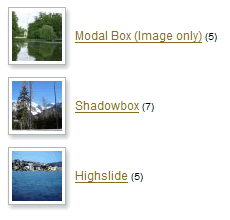 <== i need show category thumbnail like it, but my category thumbnail just show folder icon :
-
Benno
- Phoca Hero
- Posts: 10309
- Joined: 04 Dec 2008, 11:58
- Location: Germany
- Contact:
Re: How to create thumbnail for category?
Hi,
Benno
Then choose one of the options I postet you.i need show category thumbnail like it, but my category thumbnail just show folder icon
Kind regards,backend --> Components --> Phoca Gallery --> Phoca Gallery Control Panel --> Options / Parameters --> Categories View Settings (List of Categories) -->
Image Size Beside Category Name=Small (or) Medium (or) Small with Shadow (or) Medium with Shadow
Benno
-
kency
- Phoca Newbie
- Posts: 4
- Joined: 12 Jun 2011, 18:38
Re: How to create thumbnail for category?
Thanks bro, but how do i set image for category? and how can i delete image or folder when i create in multi add?
-
Benno
- Phoca Hero
- Posts: 10309
- Joined: 04 Dec 2008, 11:58
- Location: Germany
- Contact:
Re: How to create thumbnail for category?
Hi,
Display image instead of folder icon=Yes
Save your settings!
Kind regards,
Benno
backend --> Components --> Phoca Gallery --> Phoca Gallery Control Panel --> Options / Parameters --> Category View Settings (List of Images) -->but how do i set image for category?
Display image instead of folder icon=Yes
Save your settings!
Sorry, I don't understand this question. Why do you want to delete images or folders?and how can i delete image or folder when i create in multi add?
Kind regards,
Benno
-
kency
- Phoca Newbie
- Posts: 4
- Joined: 12 Jun 2011, 18:38
Re: How to create thumbnail for category?
I create a folder in Multiple Add and it include some photos, after that i deleted there photos to reduce space in Images Tab, but it still occur in my album when i check it in front end.Sorry, I don't understand this question. Why do you want to delete images or folders?
Thank you
Best Regards
-
Benno
- Phoca Hero
- Posts: 10309
- Joined: 04 Dec 2008, 11:58
- Location: Germany
- Contact:
Re: How to create thumbnail for category?
Hi,
perhaps anybody else can answer your question, because I don't understand the sence and therefore I can't answer it.
Kind regards,
Benno
perhaps anybody else can answer your question, because I don't understand the sence and therefore I can't answer it.
Kind regards,
Benno
-
uscher
- Phoca Member

- Posts: 10
- Joined: 20 May 2011, 14:32
Re: How to create thumbnail for category?
hei people
i followed this posting and i guess i know what kency's question is..becouse i have similar issue
you can add a pic to the top-level categoty. This is no problem.
The problem is, this top level picture should ONLY be visible in the Top-level category icon, but it is not.
Becouse picture is added to the top-level category, of course you can see this picture inside this category when you enter this top-level.
What he want (and me too) is, to have top-level category pictures without showing them inside the caregory itself.
Same then for sublevel-category. There are allwas shown pictures from sublevels (latest ascending, descending ...)
Just an individual category pic for each category would do it
Example: http://joomla.jimrose.ch/index.php/2011 ... ca-gallery
-> go to category 2011. You will see the category pic again inside the 2011 category
i followed this posting and i guess i know what kency's question is..becouse i have similar issue
you can add a pic to the top-level categoty. This is no problem.
The problem is, this top level picture should ONLY be visible in the Top-level category icon, but it is not.
Becouse picture is added to the top-level category, of course you can see this picture inside this category when you enter this top-level.
What he want (and me too) is, to have top-level category pictures without showing them inside the caregory itself.
Same then for sublevel-category. There are allwas shown pictures from sublevels (latest ascending, descending ...)
Just an individual category pic for each category would do it
Example: http://joomla.jimrose.ch/index.php/2011 ... ca-gallery
-> go to category 2011. You will see the category pic again inside the 2011 category
-
Jan

- Phoca Hero
- Posts: 49607
- Joined: 10 Nov 2007, 18:23
- Location: Czech Republic
- Contact:
Re: How to create thumbnail for category?
If you find Phoca extensions useful, please support the project