

I've used Phocagallery for several years but the version for Joomla 5 has me stumped.
I used to show a category of images (thumbs) in an article and then clicking on a thumb would open the original image. That is not happening.
What am I doing wrong.
Thanks.
displaying original image
-
Benno

- Phoca Hero

- Posts: 10300
- Joined: 04 Dec 2008, 11:58
- Location: Germany
- Contact:
Re: displaying original image
Hi,
which Joomla! 5 version are you using?
which Phoca Gallery Component version are you using?
which Phoca Gallery Plugin version are you using?
which Phoca Gallery Plugin code are you using?
Kind regards,
Benno
which Joomla! 5 version are you using?
which Phoca Gallery Component version are you using?
which Phoca Gallery Plugin version are you using?
which Phoca Gallery Plugin code are you using?
Kind regards,
Benno
-
hcharris
- Phoca Newbie

- Posts: 6
- Joined: 18 May 2020, 15:17
Re: displaying original image
Joomla 5 version =
From components:
Phoca Gallery Component version = 5.1.3
Phoca Gallery Plugin version = 5.0.0
Not sure what the Phoca Gallery Plugin Code is
From components:
Phoca Gallery Component version = 5.1.3
Phoca Gallery Plugin version = 5.0.0
Not sure what the Phoca Gallery Plugin Code is
-
Benno
- Phoca Hero
- Posts: 10300
- Joined: 04 Dec 2008, 11:58
- Location: Germany
- Contact:
Re: displaying original image
Hi,
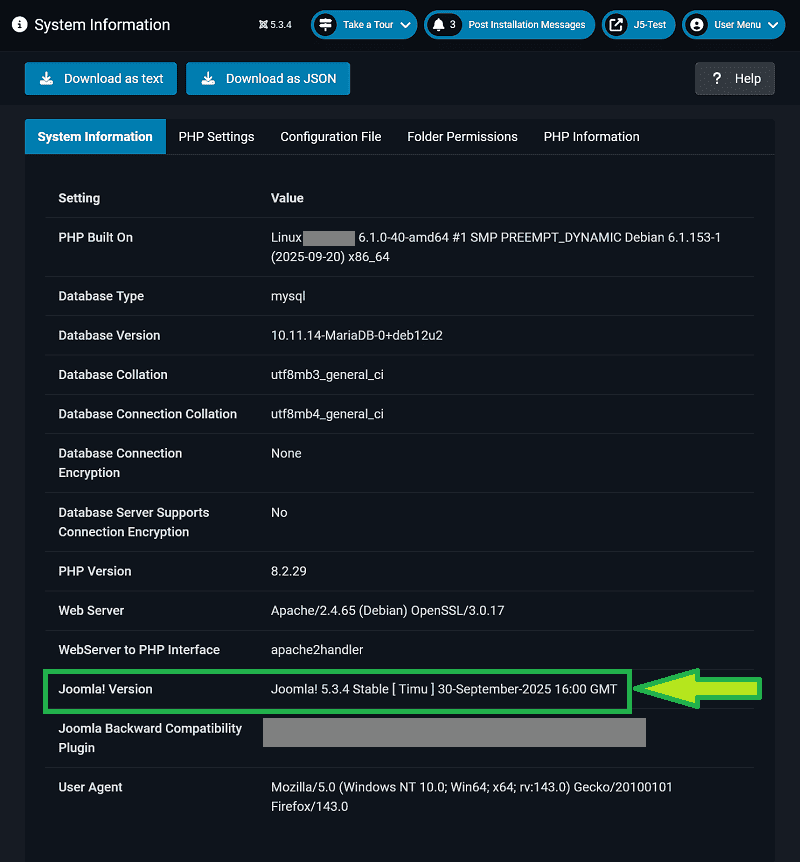
Go to: backend --> System --> System Information --> System Information --> Joomla! Version=
Please post it here.
See Image:
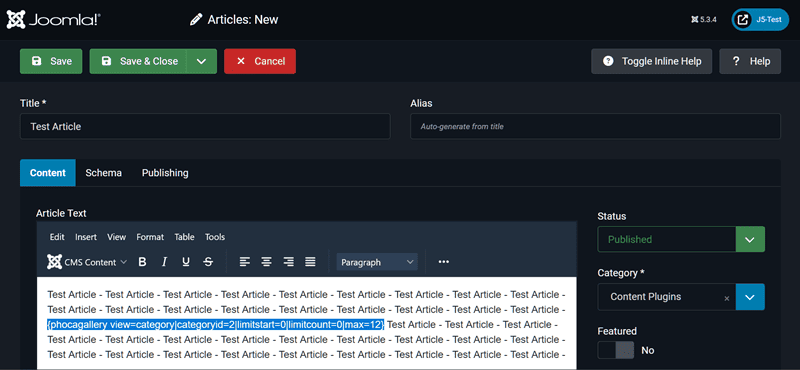
{phocagallery view=category|categoryid=2|limitstart=0|limitcount=0|max=12}
This is your used Plugin code. Please post it here.
See image:
Kind regards,
Benno
The exact Joomla! version you will find here:Joomla 5 version =
Go to: backend --> System --> System Information --> System Information --> Joomla! Version=
Please post it here.
See Image:
Go to: backend --> Content --> Articles --> The article which should display images in frontend. --> Within this article you will find something like this:Not sure what the Phoca Gallery Plugin Code is
{phocagallery view=category|categoryid=2|limitstart=0|limitcount=0|max=12}
This is your used Plugin code. Please post it here.
See image:
Kind regards,
Benno
-
hcharris
- Phoca Newbie
- Posts: 6
- Joined: 18 May 2020, 15:17
Re: displaying original image
Thank you so much.
Joomla version: Joomla! 5.3.4 Stable [ Timu ] 30-September-2025 16:00 GMT
Plugin Code: {phocagallery view=category|categoryid=11}
Joomla version: Joomla! 5.3.4 Stable [ Timu ] 30-September-2025 16:00 GMT
Plugin Code: {phocagallery view=category|categoryid=11}
-
Benno
- Phoca Hero
- Posts: 10300
- Joined: 04 Dec 2008, 11:58
- Location: Germany
- Contact:
Re: displaying original image
Hi,
I don't get this incorrect result when I click on an image in category view on my test page using the versions of Joomla! and Phoca Gallery Component and Phoca Gallery Plugin you mentioned. Have you tried testing this with the Joomla! standard template Cassiopeia (only for testing), or do you perhaps get an error message in the JS console that would explain this?
Phoca Gallery Plugin --> Category View:

Phoca Gallery Plugin --> Detail View:

Kind regards,
Benno
I don't get this incorrect result when I click on an image in category view on my test page using the versions of Joomla! and Phoca Gallery Component and Phoca Gallery Plugin you mentioned. Have you tried testing this with the Joomla! standard template Cassiopeia (only for testing), or do you perhaps get an error message in the JS console that would explain this?
Phoca Gallery Plugin --> Category View:
Phoca Gallery Plugin --> Detail View:
Kind regards,
Benno
-
hcharris
- Phoca Newbie
- Posts: 6
- Joined: 18 May 2020, 15:17
Re: displaying original image
Thank you for your patience and assistance. -Carter
-
Benno
- Phoca Hero
- Posts: 10300
- Joined: 04 Dec 2008, 11:58
- Location: Germany
- Contact:
Re: displaying original image
Hi,
If not, have you followed my recommendations, and with what result?
Benno
What does that mean? Have you found a solution, and if so, what is it?Thank you for your patience and assistance. -Carter
If not, have you followed my recommendations, and with what result?
Kind regards,Have you tried testing this with the Joomla! standard template Cassiopeia (only for testing), or do you perhaps get an error message in the JS console that would explain this?
Benno