The word "trying" in the header of this article is very important. In fact you cannot win over spammers, because:
- their spam bots are learning newest spam protection methods very quickly
- people are used as spam bots, see the following article about human spammers
Warning! (Joomla! 1.5 only):
Security parameters should be set in Parameters of the component (see Parameters button in Control Panel of Phoca Guestbook administration). Extensions can be accessed with different Itemids in frontend of Joomla! site, so allways use Parameters of the component (Global Configuration for the component) to set security settings, not Parameters in menu link to guestbook. If you are using Joom!fish - check parameters of translated menu link to guestbook in Joom!fish.
Security parameters should be set in Parameters of the component (see Parameters button in Control Panel of Phoca Guestbook administration). Extensions can be accessed with different Itemids in frontend of Joomla! site, so allways use Parameters of the component (Global Configuration for the component) to set security settings, not Parameters in menu link to guestbook. If you are using Joom!fish - check parameters of translated menu link to guestbook in Joom!fish.
Which possible protection methods Phoca Guestbook offers:
- Specific Itemid - normally, extensions can be accessed with different Itemids in frontend of Joomla! site. If specific Itemid will be set, posts can be stored by only selected menu link(s) (Itemid = Id of menu link). This is very important - it prevents from loading all guestbook items or loading guestbook form without protection methods for spam robots. Spam robots use different Itemids to access Joomla! extensions.
- Registered Users Only - probably the best method to prevent from spam, only registered users can leave a message
- Review Item - only those posts which were reviewed by administrator, will be displayed for public
- Send Email - get email about every new post which will be added to the guestbook
- Forbidden Word Filter - set forbidden words which will be not displayed for public
- Forbidden Whole Word Filter - set whole forbidden words which will be not displayed for public
- Forbidden Word Behaviour - set if post which includes forbidden words will be saved to guestbook (forbidden words will be hidden if saved) or not
- IP Ban - you can ban different IPs
- Maximum characters - set maximum characters which will be saved to database
- Maximum URL - set maximum of URLs which will be displayed in the post, zero (0) means, no url will be displayed in the post
- Not Allowed URL Identification Words - set words, which will identify not allowed URLs within the post, example: ://,.htm,.asp,.jsp,.php,www.,.com,.org,.net
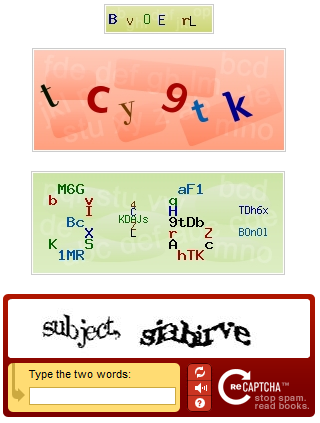
- Enable Captcha- there are 4 different Captcha methods:
- Standard Captcha
- Math Captcha
- TTF Captcha
- reCAPTCHA Captcha
- The best way is using combination of all 4 captcha methods, everytime other captcha method will be displayed on the site - don't forget, there are human spammers, so captcha itself cannot prevent from spam.
- Enable Akismet protection - see Akismet website to get more information (PHP 5 is required)
- Enable HTML Purifier - HTML Purifier is a standards-compliant HTML filter library which will remove all malicious code (better known as XSS) with a thoroughly audited, secure yet permissive whitelist
- Session Suffix - set suffix for session name to be unique for your server
- Enable Hidden Field - Some spam bots try to fill all the fields on the site, if they fill this hidden field, which human does not see, the entry will be not added into the guestbook (since Phoca Guestbook 2)
- Incoming Page - Enable or disable detecting of incoming page. If you enable it, page from which the post came to your guestbook will be stored and displayed in the backend. If the post will come through other than the guestbook page, then it means, there is some security problem on your page. For example: If you have created menu link to guestbook e.g. 'www.your_page.com/guestbook', all posts in your guestbook should have this incoming page. If some post does not have such form, then it (e.g. spam post) came to the system other than 'legal' way. Example: Menu link to your guestbook page: https://www.your_page.com/guestbook
Getting spam through following pages means:
1) e.g. https://www.your_page.com/guestbook - the post was made in the guestbook which means, there is no security problem but the robot or human spammer was able to add spam the standard way - enable Captcha, Akismet, allowing posting for registered users only or/and other security features mentioned above
2) e.g. https://www.your_page.com/option=com_phocaguestbook&view=guestbook&id=... - the robot tries to add spam through standard (non SEF) URL of your guestbook. If you set Specific Itemid parameter - the right Itemid of menu link to guestbook, then robot will be not able access this URL (If your site does not use SEF, allways check the Itemid - the only right Itemid is the Itemid of the menu link to your guestbook)
3) e.g. empty value - if you have enabled Incoming Page parameter and it works correctly and you get empty value, this mean, the spam post was added to your system by other way than through your guestbook. For example - someone use other extension to write values to your database, someone knows your login to database, etc. In such case you should check all the Joomla! installation include all extensions (and of course change the passwords to access the database, etc.).
Of course if somebody knows the login and password to your database, this is the worst case as he/she can then easily fake the incoming page. In this case, if he/she adds some spam directly to the database, he/she can then easily add faking incoming page value. Checking server logs should help in this situation.
The best method is to allow adding posts only for registered users, if this is not possible, then using combination of all 4 captcha methods. You should check your guestbook regularly - get information by email about every new added post. Enable HTML Purifier and hidden field feature. It is good to not display URLs in the posts.