In Phoca Gallery, images and categories can be commented by the following methods:
- Default comment system (only registered users can add a comment)
- External comment system - JComments
- External comment system - Facebook Comments
If you want to add Facebook comment feature to your site, you need to create a Facebook Comment Application in your Facebook Account.
- Login to Facebook
- Go to "Create an Application" site - https://developers.facebook.com/setup/
- Add site name
- Add an URL of your site
- Select language which your site is using
- Create an application - App Name, App URL, App ID and App Secret values will be created.
- Copy App ID value.
- Go to Phoca Gallery parameters in your Joomla! site, in administration (if you have created a menu link to Phoca Gallery, go to Menu Manager - Phoca Gallery menu link and change Parameters(component))
- In Comment Settings set if you want your users will be able to comment images and/or categories (set Yes)
- As External Comment Extension select Facebook
- Paste Facebook Comments Application ID (App ID you have copied from your Facebook settings)
- Set width of Facebook comments application
- Save parameters. Now your visitors should be able to comment images and/or categories on your site with help of Facebook Comment system.
Joomla! 1.6:
- Go to Components - Phoca Gallery - Facebook, click on New. Add App ID and App Secret. Click on Save button.
- Now the Facebook Comments Settings will be displayed, set parameters you need. Click on Save. Facebook User (Application) will be stored.
- Go to Phoca Gallery parameters in your Joomla! site, in administration
- In Comment Settings set if you want your users will be able to comment images and/or categories (set Yes)
- As External Comment Extension select Facebook
- Select Facebook User (Application)
- Save parameters. Now your visitors should be able to comment images and/or categories on your site with help of Facebook Comment system.
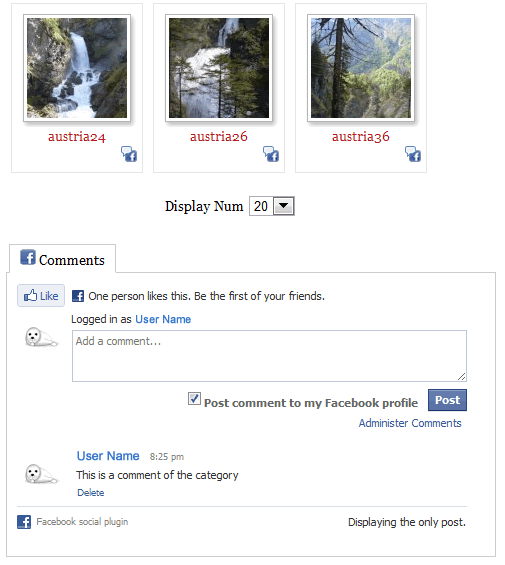
You can edit your Facebook application in your Facebook Account. Go to Account - Application Settings - click on Developer (or go to this site: https://www.facebook.com/developers/). Now you should see your application(s) in the top right area of your site. Click on your selected application to edit it.
As administrator and developer of the Facebook Comment Application you are able to admin the comments on the site. You are able to delete the comments on your site if you are logged in on the site with your Facebook login.
Because Phoca Gallery component cannot edit main html tag of your site, recommended attribute (by Facebook) should be added to your template index.php:
xmlns:fb="https://www.facebook.com/2008/fbml"
Example - setting rhuk_milkyway, modify:
templates/rhuk_milkyway/index.php
FROM:
<html xmlns="https://www.w3.org/1999/xhtml" xml:lang="<?php echo $this->language; ?>" lang="<?php echo $this->language; ?>" >
TO:
<html xmlns="https://www.w3.org/1999/xhtml"xmlns:fb="https://www.facebook.com/2008/fbml"xml:lang="<?php echo $this->language; ?>" lang="<?php echo $this->language; ?>" >
If you will allow visitors to comment images on your site, you should be aware, because while commenting image a link to this image can be created on facebook site (in user's profile who has commented the image). But this link cannot be created as popup link (modal box, highslide js, standard popup, ...), so you should set that comments will be displayed in "No Popup" window - set Display Comments in No Popup Window in Comment Settings to Yes. In case, comments will be displayed in popup window (modal box, highslide js, standard popup, ...), the link from Facebook to this comment will be not correctly displayed.
See Phoca Gallery - Facebook Comments demo site. This demo site does not include the edited html tag (seems like IE browsers have problems if the html tag is not included, so the attribute was added to the template file on demo site), Display Comments in No Popup Window is set to Yes.