Page 1 of 1
Pagination
Posted: 13 Aug 2025, 11:17
by Pens
Hi,
Is it possible to remove the Pagination box from the product view?
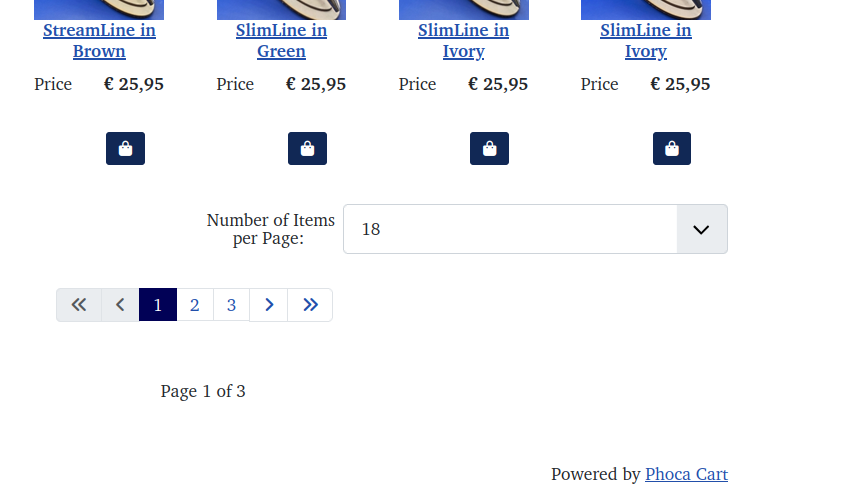
From
https://artisan-pens.com/index.php/2-al ... s/10-twist
Thanks & regards
Nick
Re: Pagination
Posted: 13 Aug 2025, 12:46
by Benno
Hi,
yes, this is possible. See images:
1.) The initial situation in the front end with pagination:

2.) Go to the options of your menu item to Phoca Cart component (Categories View) and set the parameters marked below to ‘Use Global’:

3.) Go to the Phoca Cart Options and set the marked parameters to 'Hide'.
Don't forget to increase the ‘Pagination Default Value’ in the Phoca Cart Options so that all products can be displayed even without pagination:

4.) The result in the front end:

Kind regards,
Benno
Re: Pagination
Posted: 13 Aug 2025, 15:12
by Pens
Thanks very much, is there a way to hide the 'Numbers of items displayed' selection box but retain the 'next/previous' page selector.
Regards
Nick
Re: Pagination
Posted: 13 Aug 2025, 15:46
by Benno
Hi,
no sorry, to my knowledge this is not possible.
Kind regards,
Benno
Re: Pagination
Posted: 13 Aug 2025, 15:49
by Pens
Benno wrote: 13 Aug 2025, 15:46
Hi,
no sorry, to my knowledge this is not possible.
Kind regards,
Benno
Thanks, is it possible to make the 'numbers' box smaller, i.e. to not have as much white space after the number?
Best
Nick
Re: Pagination
Posted: 13 Aug 2025, 16:00
by Pens
And to hide the pagination box when there are less products than the Pagination Default Value ?
Nick
Re: Pagination
Posted: 14 Aug 2025, 11:07
by christine
Hi,
I wanted to send this here:
But I see that there's no pagination etc. anymore.
Have you made any changes to the PHP file? (Override?)
Therefore, it can no longer be verified.
Pens wrote: 13 Aug 2025, 15:12
Thanks very much, is there a way to hide the 'Numbers of items displayed' selection box but retain the 'next/previous' page selector.
Code: Select all
.col-12.col-sm-6.col-md-6ph-center-pagination {
display: none !important;
}
is it possible to make the 'numbers' box smaller, i.e. to not have as much white space after the number?
Code: Select all
.pagination {
--pagination-padding-x: .30rem !important;
 --pagination-padding-y: .175rem !important;
}
Values as desired. (Applies to all paginations).
Kind regards
Christine
Re: Pagination
Posted: 14 Aug 2025, 11:31
by christine
Hi,
correct to this in the user.css:
Code: Select all
.col-12.col-sm-6.col-md-6.ph-center-pagination {
display: none !important;
}
Kind regards
Christine
Re: Pagination
Posted: 14 Aug 2025, 11:45
by Pens
Hi,
christine wrote: 14 Aug 2025, 11:07
But I see that there's no pagination etc. anymore.
I removed it because it looked messy in categories that had less than the default number of items.
Have you made any changes to the PHP file? (Override?)
No, just the language and user.css in templates.
Thank you very much for the code.
Re: Pagination
Posted: 14 Aug 2025, 11:45
by Pens
christine wrote: 14 Aug 2025, 11:31
Hi,
correct to this in the user.css:
Code: Select all
.col-12.col-sm-6.col-md-6.ph-center-pagination {
display: none !important;
}
Thank you, that worked perfectly
Best regards
Nick