Page 1 of 2
Folder icons and space before pagination
Posted: 28 Jun 2024, 06:24
by patpit
Hello all,
I cannot find where to go to hide the folder icon in my categories. I'd like to have the name but not the yellow folder icon. Any trick for me pls ?
Thanks
Also, between the last images in the category and the pagination numbers, I have a huge empty space. How can I get rid of that, pls?
Thanks again :)
Pat.
Re: Folder icons and space before pagination
Posted: 28 Jun 2024, 09:40
by Benno
Hi,
1.) Icons:
Code: Select all
.ph-si-category {
  display: none;
}
Copy the code into your user.css or custom.css
2.) Huge empty space
Can only be answered with given URL. Seems to be a Template issue.
Kind regards,
Benno
Re: Folder icons and space before pagination
Posted: 28 Jun 2024, 18:24
by patpit
Re: Folder icons and space before pagination
Posted: 28 Jun 2024, 22:56
by Benno
Hi,
this is how I see your site:
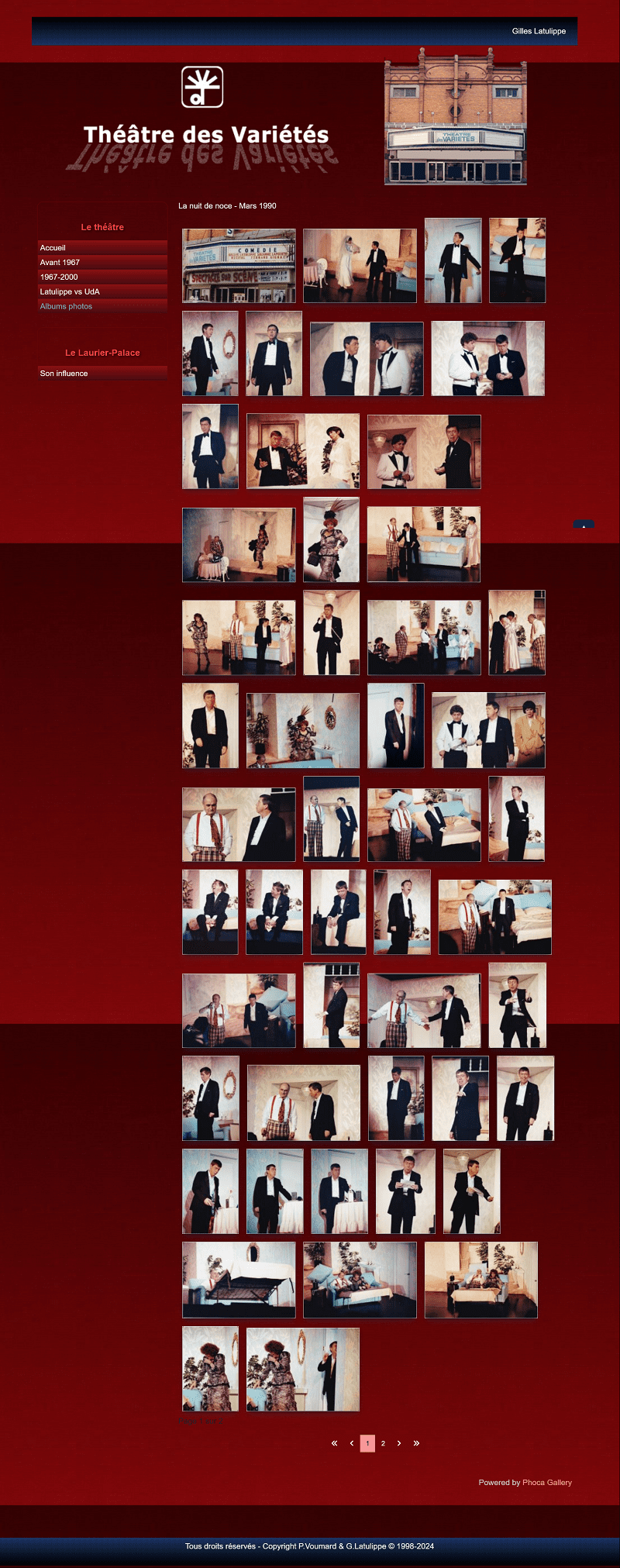
Which empty space do you mean?
Kind regards,
Benno
Re: Folder icons and space before pagination
Posted: 29 Jun 2024, 05:30
by patpit
Hi Benno...
hah.. you see it the way I want it. :) So it seems to be only a problem with Firefox... The large space is between the last row of image and the "page 1 sur 2". It's the size of a full screen (cannot take a print screen to show you).
Subsidiary question: I cannot find any user.css or custom.css (not in my template, not in Phoca's).. where are they pls?
Thanks you very much
Pat.
Re: Folder icons and space before pagination
Posted: 29 Jun 2024, 06:18
by patpit
Hi Benno (again),
if you click on Albums Photos - Spectacles, can you access any of the folders? or even the site menu? it works on firefox but not on the other browsers... :(
Getting more confused by the minute here...
Thanks again
Pat.
Re: Folder icons and space before pagination
Posted: 29 Jun 2024, 08:48
by Benno
Hi,
yes, there seems to be problem(s) with your template our your menu(s) or both. Did you create your template with a template generator such as Template-Toaster? I certainly don't know it... Maybe you should first switch to the Joomla standard template Cassiopeia to test the functionality of your menus... ?! I'll write to you again tonight about the other questions, because I don't have time right now.
Kind regards,
Benno
Re: Folder icons and space before pagination
Posted: 29 Jun 2024, 19:31
by patpit
Hi Benno,
I reinstalled my template and now the links works everywhere, but the large space is also everywhere now (every browser)..
Thanks for you help and you patience :)
Pat.
Re: Folder icons and space before pagination
Posted: 29 Jun 2024, 20:52
by Benno
Hi,
in my case I unfortunately see no difference to this morning. The upper menu 'Le théâtre' only works if I click the lower menu 'Le Laurier-Palace' first, if I use your given link. Testet with Firefox, Chrome & Edge ...

You can hide the empty space, which I also can see now, with this code:
Code: Select all
#ttr_content .modal {
display: none;
}
Copy the code into your user.css or custom.css
Kind regards,
Benno
Re: Folder icons and space before pagination
Posted: 29 Jun 2024, 23:01
by patpit
You're a genius and a savior!! Thank you so very much!
Have a great weekend
Pat.