Page 1 of 2
image view problem
Posted: 27 Jan 2013, 22:01
by awais836
if you open my site link
http://ultimatecutlery.net/index.php/daggers here you can see my images and not sorted from where i can make changes to sort them.
and also i want to show only 20 images per page at the moment it shows all my images in first page.
Re: image view problem
Posted: 28 Jan 2013, 11:19
by Benno
Hi,
Sorting: if you rename all your images to three-digit numbers (e.g. AA-01 to AA-001, AA-02 to AA-002, ......) sorting will be better.
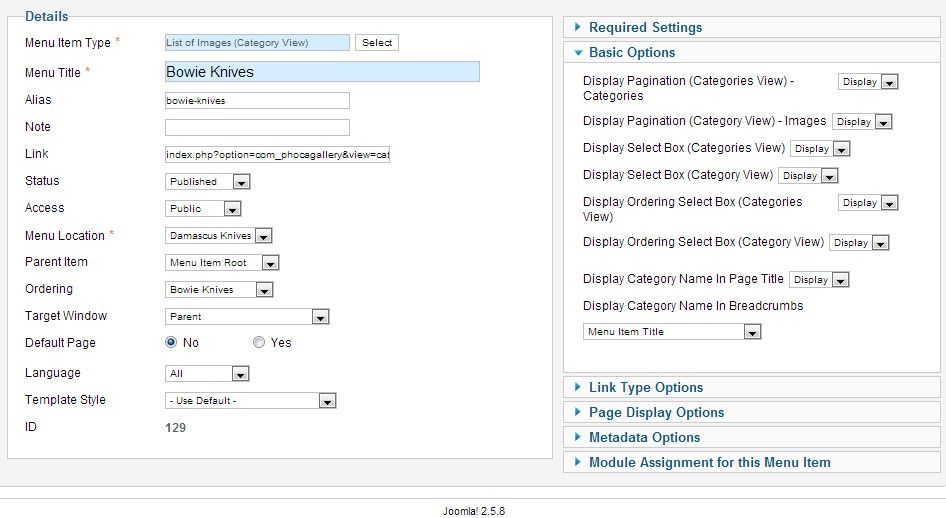
Pagination: backend --> Menus --> Your Menu with Link to Phoca Gallery Component --> Your Link to Phoca Gallery Component --> Menu Manager: Edit Menu Item --> Basic Options -->
Display Pagination (Category View) - Images=Display
Save & Close
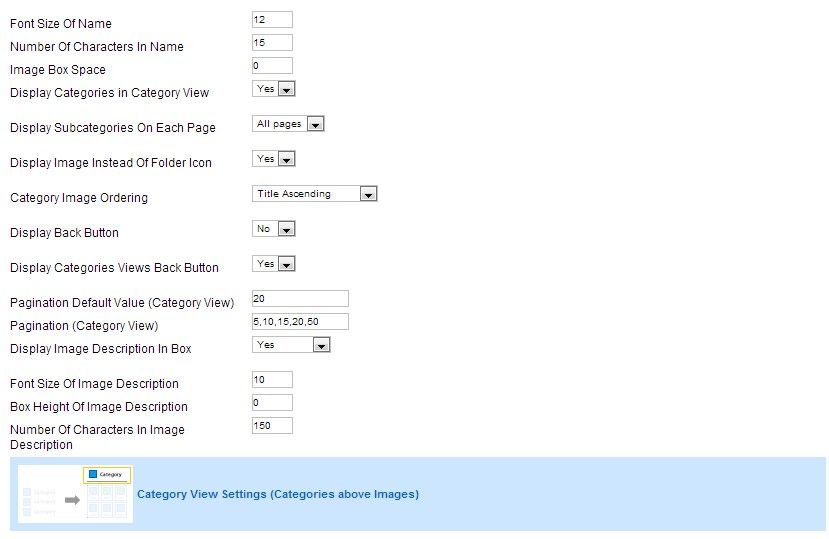
backend --> Components --> Phoca Gallery --> Phoca Gallery Control Panel --> Options --> Display --> Category View Settings --> Pagination Default Value (Category View)=20
Save & Close
Kind regards,
Beno
Re: image view problem
Posted: 28 Jan 2013, 17:25
by awais836
i set setting according to your directions with no sucess.
Re: image view problem
Posted: 28 Jan 2013, 23:03
by Benno
Hi,
i set setting according to your directions with no sucess.
Sorting or pagination or both?
Kind regards,
Benno
Re: image view problem
Posted: 29 Jan 2013, 05:51
by awais836
i change both settings, infact both settings are already same as you suggest me to change,
thanks.
Re: image view problem
Posted: 29 Jan 2013, 15:11
by awais836
it works in subcategories as in this link
http://ultimatecutlery.net/index.php/bo ... /123-aa-80 but when you go back it shows all the categories in one page.
thanks for your help
Re: image view problem
Posted: 29 Jan 2013, 15:32
by Benno
Hi,
Ok, then you should also enable Categories View Pagination.
backend --> Menus --> Your Menu with Link to Phoca Gallery Component --> Your Link to Phoca Gallery Component --> Menu Manager: Edit Menu Item --> Basic Options -->
Display Pagination (Categories View) - Categories=Display
Save & Close
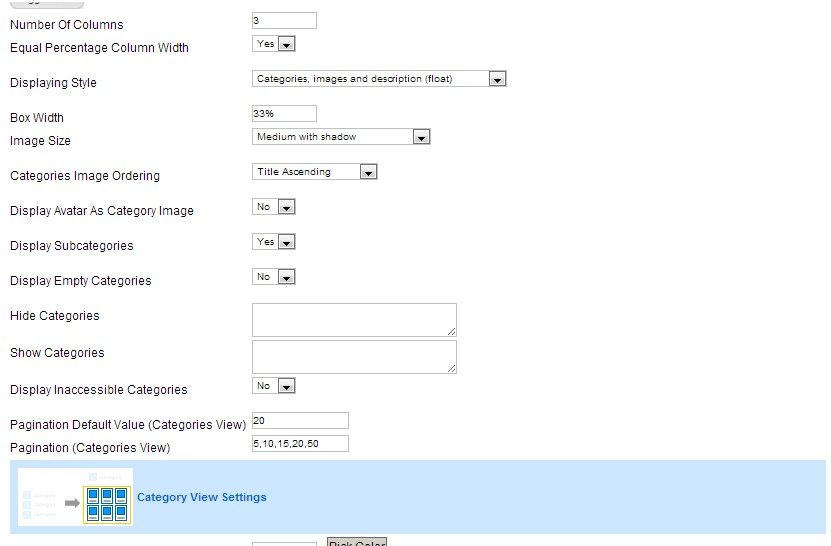
backend --> Components --> Phoca Gallery --> Phoca Gallery Control Panel --> Options --> Display --> Categories View Settings --> Pagination Default Value (Categories View)=20
Save & Close
Kind regards,
Benno
Re: image view problem
Posted: 29 Jan 2013, 16:55
by awais836
i change setting's according to your following directions with no success.
"Pagination: backend --> Menus --> Your Menu with Link to Phoca Gallery Component --> Your Link to Phoca Gallery Component --> Menu Manager: Edit Menu Item --> Basic Options -->
Display Pagination (Category View) - Images=Display
Save & Close
backend --> Components --> Phoca Gallery --> Phoca Gallery Control Panel --> Options --> Display --> Category View Settings --> Pagination Default Value (Category View)=20
Save & Close"
i am very upset about it.
Re: image view problem
Posted: 29 Jan 2013, 17:14
by Benno
Hi,
i change setting's according to your following directions with no success.
"Pagination: backend --> Menus --> Your Menu with Link to Phoca Gallery Component --> Your Link to Phoca Gallery Component --> Menu Manager: Edit Menu Item --> Basic Options -->
Display Pagination (Category View) - Images=Display
Save & Close
backend --> Components --> Phoca Gallery --> Phoca Gallery Control Panel --> Options --> Display --> Category View Settings --> Pagination Default Value (Category View)=20
Save & Close"
This guide enable "Category View Pagination".
And as you wrote, this works.
If you also want pagination for your root categories (Categories View) you must enable "Categories View Pagination".
As I wrote in my last post:
backend --> Menus --> Your Menu with Link to Phoca Gallery Component --> Your Link to Phoca Gallery Component --> Menu Manager: Edit Menu Item --> Basic Options -->
Display Pagination (Categories View) - Categories=Display
Save & Close
backend --> Components --> Phoca Gallery --> Phoca Gallery Control Panel --> Options --> Display --> Categories View Settings --> Pagination Default Value (Categories View)=20
Save & Close
Kind regards,
Benno
Re: image view problem
Posted: 30 Jan 2013, 03:41
by awais836