Page 1 of 1
Getting rid of large thumbnail over gallery
Posted: 07 Oct 2010, 20:26
by karl78
I want to get rid of the large thumbnail image that is always present over my smaller thumbnails in the gallery view as seen in the pic below. I just want to see the small thumbs, if I want to see the photo larger I will click on it and it will open up in JAK Lightbox for example. I wouldn't mind if it stayed there if it were much smaller, say 400 width, however if I do that than the image will also be 400 width when I open it in the JAK box...
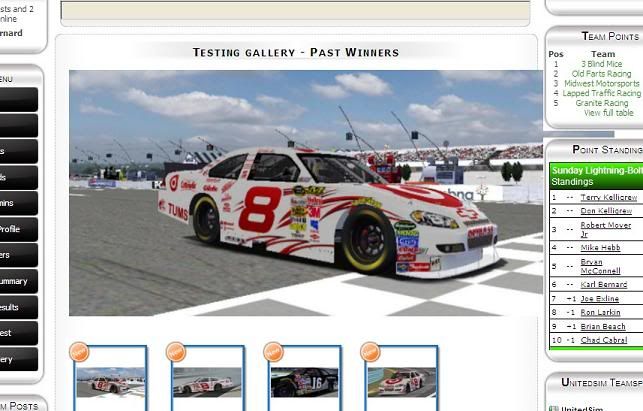
Re: Getting rid of large thumbnail over gallery
Posted: 08 Oct 2010, 14:05
by Jan
Hi, does the resizing of switch work for you, see
https://www.phoca.cz/documents/2-phoca-g ... -menu-item
Switch Image Enable or disable Switch (swap) image behaviour.
Switch Image width Width of main Switch image.
Switch Image height Height of main Switch image.
so switch image will be resized to some small value and in the jak the large thumbnail will be displayed.
Jan
Re: Getting rid of large thumbnail over gallery
Posted: 10 Oct 2010, 04:38
by karl78
Jan wrote:Hi, does the resizing of switch work for you, see
https://www.phoca.cz/documents/2-phoca-g ... -menu-item
Switch Image Enable or disable Switch (swap) image behaviour.
Switch Image width Width of main Switch image.
Switch Image height Height of main Switch image.
so switch image will be resized to some small value and in the jak the large thumbnail will be displayed.
Jan
Yes this worked for me thank you
Re: Getting rid of large thumbnail over gallery
Posted: 11 Oct 2010, 14:33
by Jan
Ok